

Start coding with agents
A setup guide for designers who have never used GitHub, Vercel or Convex. The repo lives on GitHub and a clean local copy lives on your Mac. You click through a few apps, visit Terminal once, and let Claude Code do the rest from prompts. By the end you have a real app, a preview link for every change, and several agents working side by side in Conductor.
Read {{llms_url}} and use it as the source of truth for the Agent Coding Field Guide. Follow its links when you need more detail. Ask me which setup step I'm on and what I've already completed, then guide me through the next step one action at a time. Pause whenever I need to click or approve something, and don't skip ahead. Stefan H.Updated September 19, 2026









Eight tools, one job each
Agent coding means you describe a change and a model does the work: it reads files, runs commands, edits code and checks its result. Your job moves from typing code to writing clear tasks and reviewing what comes back. These tools make that safe to do many times a day.
ConductorMac app that runs several agents at once, each in its own copy of the repo.
Claude CodeThe agent. It runs inside Conductor on your Claude plan.
 GitHub
Stores the code and its history. Changes arrive as pull requests.
GitHub DesktopClones repos to your Mac and shows history, without typing Git commands.
Vite+One vp command for the dev server, build, lint, format and tests.
shadcn/uiComponents copied into your repo, built on Base UI primitives.
ConvexBackend and database written in TypeScript next to your UI.
VercelHosts the app. Builds a preview link for every pull request.
my-app
├── .agents/skills/        every skill: design-review, open-pr, pre-review, ci-watch and more
├── .claude/               links to those skills for Claude Code, plus subagents
├── .conductor/settings.toml setup and run scripts for every workspace
├── .github/               CI workflows and the pull request template
├── convex/                backend functions, schema, seed data and tests
├── docs/                  architecture, decisions and guides, one template
├── e2e/                   Playwright smoke tests
├── scripts/               Vercel build and skip rules for preview backends
├── src/components/        ui/ for shadcn, features/ for everything you build
├── AGENTS.md              instructions every agent reads
├── CLAUDE.md              Claude Code's entry point, imports AGENTS.md
├── components.json        shadcn config
├── vercel.json            points Vercel at the scripts above
└── vite.config.ts         Vite+ config: dev, build, lint, format, test
You won't create most of this by hand. Eight prompts in steps 5 to 11 build it.
Words you'll hear
You don't need to learn Git commands. GitHub Desktop, Conductor and the agent run them. You do need the vocabulary, because it shows up on every screen.
| Term | What it means for you |
|---|---|
| Repository | The project folder plus its full history, stored on GitHub. People say repo. |
| Clone | Download a repo from GitHub to your Mac so you can work on it. |
| Commit | A saved snapshot of changes with a short message. |
| Branch | A separate line of work. You change things there without touching the live app. |
main | The branch that is live. Changes should reach it through a pull request. |
| Pull request (PR) | A request to merge a branch into main. This is where you review. |
| Worktree | A second copy of the repo in another folder, on its own branch. Conductor calls it a workspace and names each one after a city. |
| Preview deployment | A private URL Vercel builds for a PR so you can click through the change. |
| Dev deployment | A Convex backend and database for building. Production is separate. |
| Deploy key | A secret that lets Vercel push your Convex backend during a build. |
| Context window | Everything the agent can "see" in one chat: your messages, files it read, command output. |
ConductorPrompt in a workspaceOwn branch, folder, port and Convex backendYou write itGitHubPull requestDiff, checks and comments in one placeAgent opens itVercel + ConvexPreviewA link to click, with its own backendAutomaticGitHubMerge to mainOnly after you've looked at the previewYou decideVercel + ConvexProductionDeploys on its own after the mergeAutomaticWhy not one long chat
The obvious way to start is to open Claude Code once and build the whole app in a single conversation. It feels great for an hour. Then the agent starts forgetting decisions, repeating mistakes and touching files it shouldn't. That isn't bad luck. It's how these models work.
What a context window is
It's everything the model can see at once: its own instructions, AGENTS.md and CLAUDE.md, your messages, every file it opens and every command output it reads. It's measured in tokens, chunks of text a little shorter than a word. Claude Code's docs use a 200,000 token window as the example; some models hold a million. Nothing slides out quietly. When the window fills up, Claude Code compacts the chat into a summary and the details are gone.
Illustration based on Anthropic's context window example. One small bug fix uses about 19 thousand of 200 thousand tokens: about 7.9 thousand loaded before you type, 7.6 thousand of files and rules, 2 thousand of command output, 1.4 thousand of edits and replies, and under 100 of your own messages.
One small bug fix
about 19K of 200K tokensPoint at a slice to see what is in it.System prompt, CLAUDE.md, skill list, memory4 source files, 2 rulesgrep, test run, formatter hooks2 edits, 1 summary1 prompt, 1 follow-up
Ten fixes like it fill the window and trigger compaction, which rewrites the oldest fixes as one short summary to make room.
Ten fixes later, same chat
Compaction. The oldest fixes are rewritten as a short summary to make room. What you agreed during fix 1 now lives in a sentence, if anywhere.
With a subagent
separate windowOnly the answer comes back. The file reads stay in the subagent's own window, so your chat stays small.
Numbers from Anthropic's interactive context window example in the Claude Code docs.
One long chat, or one workspace per task
One long chat
1 branchOne workspace per task
4 branchesIllustration of the idea, not a benchmark. Real timing depends on how fast you review.
The context window is a budget
Every message, file read and command output stays in the chat. Anthropic's Claude Code guide puts it plainly: Claude's context window fills up fast, and performance degrades as it fills.
Chroma tested 18 models and found performance grows increasingly unreliable as input length grows.
Compaction drops the details
When the window fills, Claude Code summarizes the conversation to make room. The docs are clear about the cost: full tool outputs and intermediate reasoning are gone.
The spacing rule you agreed on two hours ago survives as a vague sentence, or not at all.
Everything becomes one change
One chat on one branch ends as one enormous pull request. You can't ship the finished screen while the broken one waits, and you can't undo one feature without undoing the others.
You wait in line
One agent does one thing at a time. With a workspace per task, three agents work while you review whichever finishes first. A fresh chat also reviews better: Claude won't be biased toward code it just wrote.
When one chat is the right call. Work that has to land together, like a new database field and the screen that uses it, belongs in one workspace. Conductor's docs: use one workspace when the work shares the same branch, code state, and context.
Split by what can ship on its own, not by file type.
A model for each job
Models differ in how deeply they reason and what they cost. The strongest ones are worth it where a wrong call is expensive: planning, splitting work and reviewing. Typing out a planned change or searching the codebase doesn't need them. Conductor lets you pick the model for every chat, from Claude Code or Codex, so you can mix them.
Opus · plan modePlans, splits the work into pieces, reviews every diffFew tokens, the most expensive modelHaikuWhere does task state live?Returns paths and a five line summarySonnetBuild the task list screenReturns the diff and a passing checkSonnetAdd the toggle mutation and its testReturns the diff and a passing checkIllustration. Subagents run in their own context windows, so all their reading stays out of the main chat.
| Job | Where it runs | Model |
|---|---|---|
| Plan, split, review | The chat you type in, with plan mode on (⇧Tab) | The strongest you have: Claude Opus, or Codex at high reasoning |
| Build one planned piece | An implementer subagent | Sonnet. Anthropic's docs: it handles most coding tasks well and costs less than Opus |
| Search code, read logs | The Explore subagent | Haiku, fast and cheap for reading |
| Code review | Conductor's Review action | A different model from the one that wrote the code, like Codex reviewing Claude's work |
| Small, obvious edits | Any chat, with fast mode on | Whatever is fastest for you |
- Pick per chat in Conductor. The composer's model picker lists Claude Code and Codex models. For defaults,
~/.conductor/settings.tomlhasmodels.defaultfor new chats andmodels.reviewfor reviews. - Give subagents their own model. A subagent is a file in
.claude/agents/with amodel:line. Claude Code hands work to it when the task matches its description, or when you name it. Prompt 6 in step 9 addsimplementeron Sonnet andExploreon Haiku. - Ask for orchestration. The
orchestrateskill from prompt 6 tells the main chat to plan, delegate each piece with a complete brief, and review the results itself. Type/orchestratebefore a bigger task. - Outside Conductor. In Claude Code in a terminal,
/model opusplanuses Opus while plan mode is on and Sonnet once it starts building.
Why it matters on a subscription. Opus costs more per token, so it uses up a plan's limits faster. Keeping it on decisions and letting Sonnet and Haiku do the volume work stretches the same plan across more tasks.
Inside Conductor
You'll spend most of your time in this window. Both screenshots come from Conductor's website, and the numbers match the notes under each one.
A workspace in the middle of a task
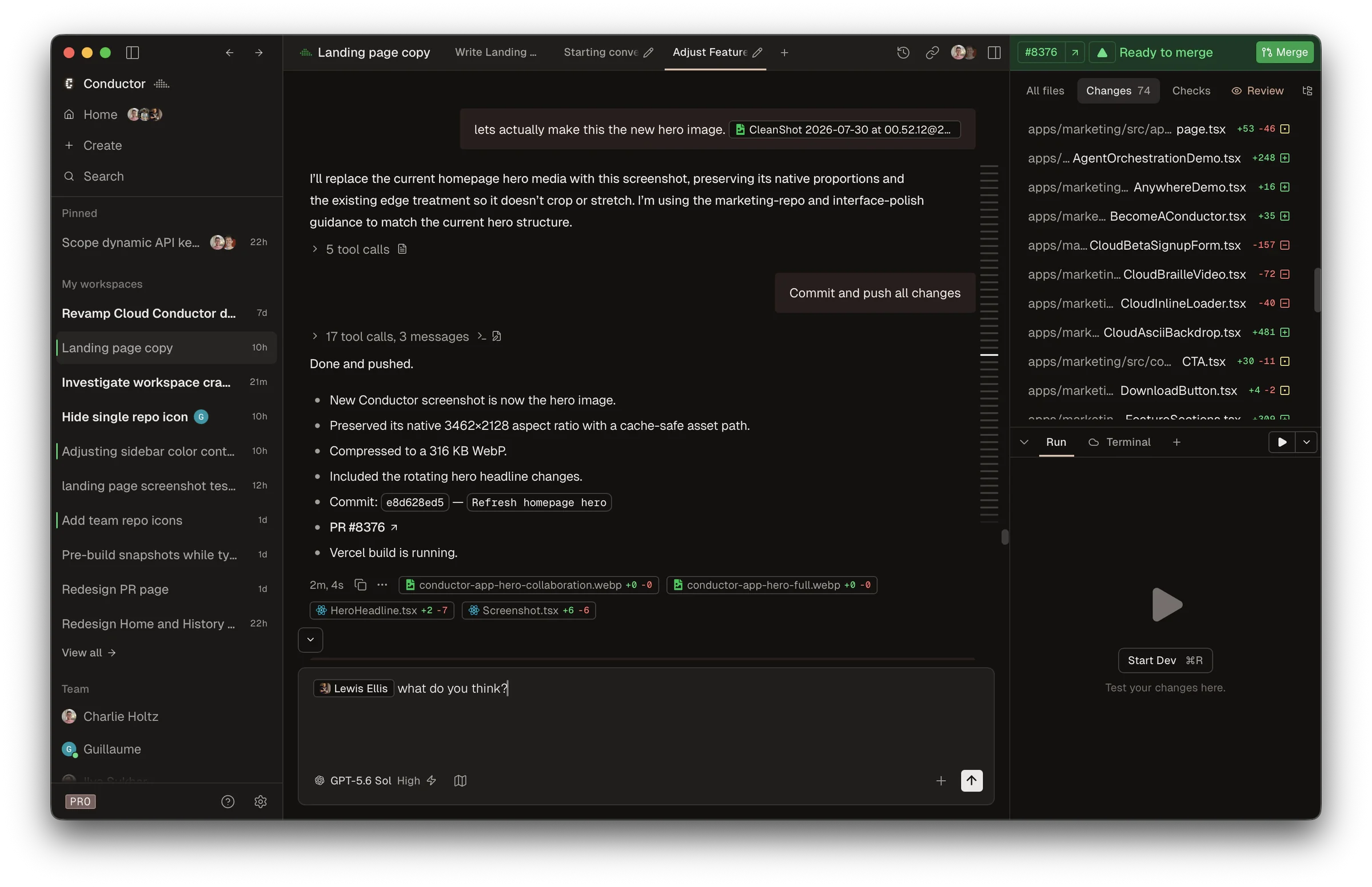
Swipe sideways to see the whole window.
- Workspaces. One row per task. Each has its own branch and its own copy of the repo, so agents never edit the same files.
- Chat tabs. Chats in the same workspace share its files. Open a second tab for a review or a quick question.
- What the agent did. Tool calls are the files it read, the commands it ran and the edits it made. Open them when a result looks wrong.
- Composer. Type the task, @mention files, attach a screenshot with ⌘U. Under it: model, fast mode, thinking level and plan mode.
- Pull request. Once the PR exists, its number and state show here. The suggested action changes as the work moves, ending with Merge.
- Changes, Checks, Review. Changes lists edited files with lines added and removed. Checks collects CI, deployments, comments and todos. Review asks an agent to read the diff.
- Run and Terminal. Run starts the run script from
.conductor/settings.tomlon this workspace's own port (⌘R). Terminal opens a shell already inside the workspace.
Screenshot from conductor.build. It comes from a team account using a different model, so the Team list and model name won't match yours.
A brand new workspace
What you see right after ⌘N, before typing anything.
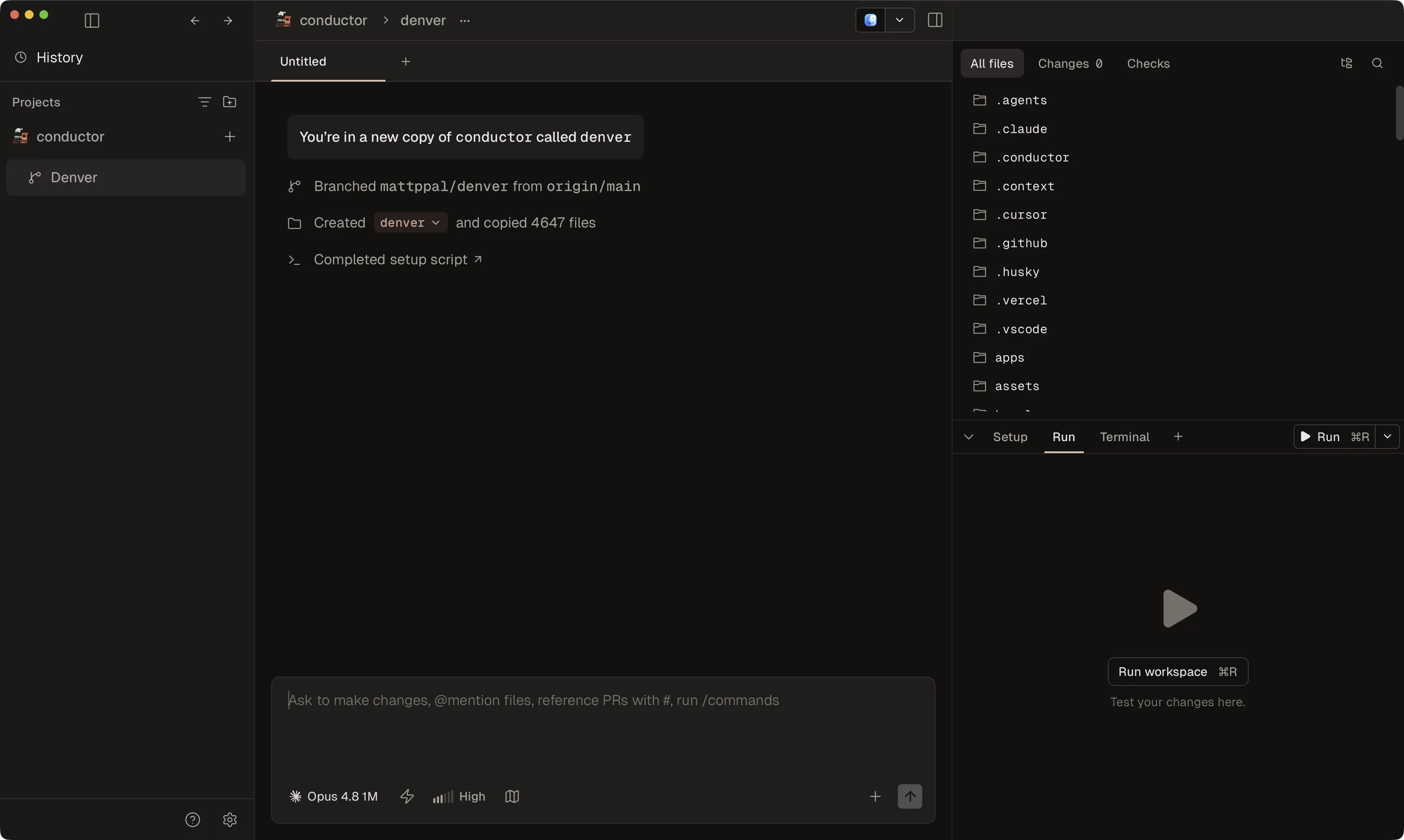
Swipe sideways to see the whole window.
- The workspace. Named after a city. The city is its folder on disk; the branch name says what the work is.
- A new copy. A git worktree of the repo. Your clone in
~/Developerisn't touched. - A fresh branch from the latest
origin/main. Work that depends on another PR should wait until that PR merges. - Files. Git's tracked files are checked out. Ignored files such as
.env.localare copied only if they match Files to copy, which defaults to.env*. - Setup script. From
.conductor/settings.toml: installs packages and creates this workspace's Convex backend. Click it for the log. - All files, Changes, Checks. Changes 0 means nothing is edited yet. It fills up as the agent works.
- Setup, Run, Terminal. Setup keeps the setup script's output. Run stays empty until you press ⌘R.
- Composer.
@for files,#for pull requests,/for commands and skills such as/pre-review.
Screenshot from Conductor's docs.
Accounts
- GitHub. Create a free account at github.com. Everything else signs in with it.
- An AI plan. Claude Pro or Max for Claude Code, or a ChatGPT plan for Codex. Conductor runs both and you pick the model for each chat, so one of them is enough to start. This guide's skills are written for Claude Code; Codex reads AGENTS.md.
- Vercel. Sign up at vercel.com with Continue with GitHub.
- Convex. Sign in at dashboard.convex.dev with GitHub.
Conductor has no account to create. It's free for local workspaces and uses your own Claude or ChatGPT plan, so there's no second AI bill.
Install the apps
- GitHub Desktop. Download it from desktop.github.com, unzip it, open it and sign in to GitHub.com.
- Conductor. Download it from conductor.build and drag it to Applications. Don't open it yet.
One visit to Terminal
Conductor checks GitHub through the GitHub CLI, agents need Node.js to run project tools, and agent-browser lets them look at what they built. Open Terminal (⌘ Space, type Terminal) and paste these one at a time. After this, the agent runs the commands.
What Homebrew is. Homebrew is the free installer most developers use on a Mac, like an App Store you use from Terminal. The first command below installs Homebrew itself. After that, brew install adds tools such as the GitHub CLI and Node.js, and brew upgrade keeps them current.
# Homebrew, the installer for developer tools. It asks for your Mac password.
~ % /bin/bash -c "$(curl -fsSL https://raw.githubusercontent.com/Homebrew/install/HEAD/install.sh)"

# GitHub CLI, Node.js and agent-browser
~ % brew install gh node agent-browser

# Claude Code and Vite+
~ % curl -fsSL https://claude.ai/install.sh | bash
~ % curl -fsSL https://vite.plus | bash
Before the next block. Homebrew finishes with a Next steps section. Run the commands it lists, then close Terminal and open a new window so the new tools are found.
- Install block finished. All four commands ran without errors.
- Next steps done. You ran Homebrew's commands and opened a new Terminal window.
# Answer: GitHub.com, HTTPS, Yes, Login with a web browser
~ % gh auth login

# Signs in to your Claude account in the browser. Type /exit when it's done.
~ % claude

# Signs in to Convex so agents can create backends for you
~ % npx convex login

# Downloads the Chrome that agent-browser drives
~ % agent-browser install

# Context7: current library docs for Claude Code. Signs in with the browser.
~ % npx ctx7 setup --claude --mcp- Logged in. GitHub, Claude, Convex and Context7 all opened the browser and confirmed, and agent-browser finished downloading Chrome.
That's the whole Terminal part. Close it.
A browser for agents
agent-browser is a command line browser built for coding agents. The agent opens your dev server in it, resizes it to phone width, tabs through the screen, clicks the main action and takes screenshots it looks at itself. The design-review skill from step 5 uses it to check design work before you open the diff, and the open-pr skill from step 6 attaches the same screenshots to the PR.
Current docs for agents
Models learn from a snapshot of the web, and Vite+, Base UI and Convex change faster than that snapshot. Context7 is an MCP server, a plug-in that gives agents a tool. It looks up the current docs and code examples for a library, so the agent checks the real API instead of guessing from memory. The last command created a free account and connected it.
| Where | What it holds |
|---|---|
| ~/.claude.json | The Context7 server and your own API key, for every project on this Mac. Written by ctx7 setup. |
| ~/.claude/rules/context7.md | A rule telling Claude Code to use Context7 for library docs, setup and configuration. |
| AGENTS.md, in the repo | The same rule for every agent and teammate, with no key. The setup prompt in step 5 adds it. |
Using Codex? Run npx ctx7 setup --codex --mcp as well. It writes the server into ~/.codex/config.toml and the rule into ~/.codex/AGENTS.md. Teammates run the same commands with their own account, so no key is ever shared or committed.
Create on GitHub, clone to your Mac
The repo starts on GitHub, the shared copy everyone pulls from. Then GitHub Desktop clones it into a local folder where Conductor and the agents work. No commands.
Create the repo on github.com
- Go to github.com/new. Owner is you, or your team's organization if you have one.
- Name it
my-appand choose Private. - Add a README, set .gitignore to Node, skip the license, and click Create repository.
Give code a home outside Documents
Don't clone into Documents or Desktop. GitHub Desktop suggests a folder inside Documents. If iCloud's Desktop & Documents Folders setting is on, those folders sync to iCloud, and iCloud can't reconcile Git's internal files, which is how repos end up with errors like fatal: bad object. Optimize Mac Storage can also move files off your Mac when space runs low. GitHub is the backup, so the code folder shouldn't sync anywhere else.
- In Finder press ⇧⌘H to open your home folder.
- Choose File, then New Folder, and name it
Developer. Every project you clone goes in here.
Clone with GitHub Desktop
- Open GitHub Desktop, then Settings, then Git. Check your name and pick the email on your GitHub account, then Save. Every commit carries these.
- Choose File, then Clone Repository. On the GitHub.com tab, select
my-app. - Next to Local Path click Choose and pick your Developer folder. The path should end in
/Developer/my-app. - Click Clone.
| Where | What lives there |
|---|---|
| github.com/you/my-app | The shared copy. Pull requests, reviews and history. |
| ~/Developer/my-app | Your main folder, cloned by GitHub Desktop. It stays on main. |
| ~/conductor/workspaces/my-app | One folder per Conductor workspace, each on its own branch. Agents work here. |
| .env.local | Local secrets like the Convex URL. Ignored by Git, never uploaded. |
| ~/.claude | Your personal Claude Code settings and skills, shared by every project. |
| Convex cloud | A dev backend per workspace, plus preview and production backends. |
Joining someone else's project? Skip the github.com part. Clone their repo into Developer the same way, then go to step 4. The prompts in steps 5 and 6 are probably merged already.
Add it to Conductor
- Open Conductor. Its setup checks look for GitHub and Claude Code logins; both should pass after step 2.
- Add a repository (⌘⌥A), choose Open project, and pick
~/Developer/my-app. - Conductor creates a workspace on a new branch, in its own folder under
~/conductor/workspaces. That's where the agent works. - Context7 is connected. Type
/mcp-statusin the workspace chat and look for context7. If it's missing, click the plug icon in the composer and refresh.
One branch, one place. GitHub Desktop shows your main folder. Git lets a branch be checked out in only one folder at a time, so don't switch GitHub Desktop to a branch a Conductor workspace is using. Leave it on main and use it to look at history.
One setup prompt
Paste this into the first workspace. It builds the starter app, adds Vite+ with linting, and writes the agent instructions and Conductor settings, all on one branch, so you review and merge a single PR. The known issues in it are real: all four came up when this setup was tested, and naming them saves the agent from guessing.
Set up this repo on one branch, as one PR: the app, Vite+ with linting, agent instructions and Conductor settings. Keep README.md, and merge .gitignore instead of replacing it. Commit after each part.

Part 1: the app
1. The shadcn CLI can't scaffold into a folder that already has files. In a temp folder run npx shadcn@latest init -t vite --base base --preset nova --name my-app, then move everything except .git into this repo and run npm install.
2. Migrate to Vite+ with npx -p vite-plus vp migrate --no-interactive.
3. Add Convex. I'm already logged in. Get my team slug from npx convex login status, then create a new project called my-app with a cloud dev deployment using the non-interactive flags of npx convex dev --once (check --help).
4. Wrap the app in ConvexProvider in src/main.tsx using VITE_CONVEX_URL.
5. Run npx convex ai-files install, npx skills add shadcn/ui --yes and npx skills add vercel-labs/agent-browser --yes.
6. Add vercel.json with buildCommand set to npx convex deploy --cmd-url-env-var-name VITE_CONVEX_URL --cmd 'npm run build', so Vercel deploys the backend and the site together on every push.

Known issues with Vite+ 0.3.2. Fix them if you hit them:
1. package.json devEngines pins npm 12 with onFail "download", so npm 10 and 11 refuse to run. Change onFail to "warn".
2. vite.config.ts has allowCompoundComponents in the lint config, which breaks the TypeScript build. Remove that line.
3. The linter flags __dirname in vite.config.ts and blocks commits. Use import.meta.dirname.
4. vp check reports react/only-export-components in src/components/ui, because shadcn files export variants next to components. Add a lint override for src/components/ui that turns that rule off, placed last in the overrides list.

Part 2: agent instructions. Keep every file short.
1. CLAUDE.md: make @AGENTS.md the first line so Claude Code reads AGENTS.md too. Under it add a "Claude Code" section: use plan mode for changes to convex/schema.ts, and run the design-review skill after UI work. Keep the Convex block.
2. AGENTS.md: add a project section at the top, above the Vite+ and Convex blocks. List the real commands from package.json. UI rules: add components with the shadcn CLI; components use Base UI, so never import @radix-ui; colors, radius and spacing come from the CSS variables in src/index.css; every screen has loading, empty and error states.
3. AGENTS.md, a Docs rule: when Context7 is connected, look up the current docs for Vite+, Base UI, shadcn/ui, Convex or any other library before writing code against it.
4. AGENTS.md, a Skills rule: repo skills live in .agents/skills/NAME/SKILL.md, where Codex reads them, with a relative symlink at .claude/skills/NAME for Claude Code. That's the layout npx skills add already used.
5. The design-review skill is pasted below this prompt. Save it as .agents/skills/design-review/SKILL.md, link it, and check its commands and paths against this repo. Add .screenshots/ to .gitignore. It uses agent-browser, which I installed with Homebrew; check that agent-browser --version works.

Part 3: Conductor. Create .conductor/settings.toml from the schema at https://conductor.build/schemas/settings.repo.schema.json.
1. Setup script: npm ci, then give the workspace its own Convex dev deployment with npx convex deployment create --type=dev TEAM:PROJECT:dev/$USER-conductor/$CONDUCTOR_WORKSPACE_NAME --select --expiration "in 14 days". Fill in TEAM and PROJECT from npx convex login status and .env.local.
2. A default run script called dev: npx convex dev --start "npm run dev -- --port $CONDUCTOR_PORT --strictPort".
3. Set run_mode to "concurrent" and git.archive_on_merge to true.
4. Add .conductor/settings.local.toml to .gitignore.

Run every CLI non-interactively (CI=1) so nothing waits for input. Done when npm run build and npx vp check both pass and all three parts are committed.
---
name: design-review
description: Check UI changes against our design rules, then look at them in a real browser with agent-browser. Use after building or changing a screen, before the open-pr skill, or when asked to polish UI.
---

# Design review

Most design bugs only show on screen. Read the code, fix what breaks the
rules, then open every changed screen in a browser and look at it.

This skill edits files. It never commits.

## 1. Find the screens

```bash
git fetch origin --quiet
git diff --name-only $(git merge-base origin/main HEAD) -- src
git diff --name-only -- src
```

List the routes those files render. If no screen changed, stop and say so.

## 2. Read the code

| Check                  | Rule                                                  |
| ---------------------- | ----------------------------------------------------- |
| Color, radius, spacing | CSS variables from src/index.css, no hex or px values |
| Components             | From src/components/ui, built on Base UI, no @radix-ui |
| States                 | Loading, empty and error for every query              |
| Copy                   | Sentence case, no placeholder text                    |

Fix what fails before opening the browser.

## 3. Look at it

Start the dev server if it isn't running, on this workspace's port. Use
agent-browser. If you're unsure of a command, run
`agent-browser skills get core` once. Save images to `.screenshots/`, which
git ignores.

```bash
agent-browser open http://localhost:$PORT/tasks
agent-browser set viewport 1440 900
agent-browser screenshot .screenshots/tasks-desktop.png
agent-browser set viewport 375 812
agent-browser screenshot --full .screenshots/tasks-mobile.png
agent-browser set media dark
agent-browser screenshot .screenshots/tasks-mobile-dark.png
```

`set media dark` works when the theme follows the system. If the app has a
theme toggle instead, click it. Skip dark when the app has no dark mode.

Open every image and look at it:

1. Nothing overlaps, clips or runs off the edge at 375 wide.
2. Spacing, alignment and type sizes match the screens around it.
3. Text and icons are readable in light and dark.
4. The data has loaded. No spinner, error or sign-in page.

## 4. Use it

```bash
agent-browser snapshot -i
agent-browser press Tab
agent-browser eval "document.activeElement.outerHTML"
agent-browser click @e2
agent-browser screenshot .screenshots/tasks-add-dialog.png
agent-browser eval "document.documentElement.scrollWidth > innerWidth"
agent-browser errors
agent-browser console
agent-browser close
```

1. Tab through the screen. Every control shows a visible focus ring, in
   reading order.
2. Click the main action and screenshot what opens.
3. The scroll check prints false at 375 wide.
4. errors and console show nothing new from this change.

If a state can't be reached in the browser, say which one instead of
guessing. Without agent-browser, take the screenshots in step 3 with
`npx playwright screenshot --viewport-size "375, 812" URL FILE` and say that
step 4 was skipped.

## 5. Gates

```bash
npx vp check
npm run build
```

## Reply

A short list: what you fixed, the screenshot paths, and anything you
couldn't check. Leave the screenshots in place for the open-pr skill.

## Never

- Never call a screen checked without opening its screenshot.
- Never hide overflow or shrink text to make a layout fit.
- Never add a hex color, px value or another component library to pass a check.
- Never commit screenshots.- Paste it and let it work. It runs commands for a while and commits after each of the three parts. Answer if it asks you something.
- Check it looks right. Type
/design-review. The agent starts the dev server, opens the starter screen in agent-browser at desktop and phone width, and replies with what it fixed and the screenshots it took. - Ship it. Open the diff (⌘⇧D), create the PR (⌘⇧P) and merge it (⌘⇧M). The diff is huge because it's the whole scaffold. Later PRs should be small.
- New workspaces are ready. Create one with ⌘N. Its setup script runs on its own and gives it a backend and a port.
To see the merged app in your main folder, click Fetch origin in GitHub Desktop, then Pull origin.
What the setup adds
| File | What it's for | When it loads |
|---|---|---|
| AGENTS.md | House rules for Codex, Cursor, Copilot and dozens of other agents. Vite+ and Convex write sections too. | Every session |
| CLAUDE.md | Claude Code reads CLAUDE.md, not AGENTS.md, so its first line imports AGENTS.md. | Every session |
| .agents/skills | Skill folders, each with a SKILL.md playbook. Codex reads them here. shadcn and agent-browser install theirs; the prompt adds design-review. | When relevant, or when you type /name |
| .claude/skills | Links to the same folders, so Claude Code reads one copy instead of a second one that drifts. | Same |
| .conductor/settings.toml | What Conductor runs when it creates a workspace and when you press Run. | Every new workspace |
| vercel.json | Tells Vercel to deploy the Convex backend together with the site. | Every deploy |
Keep instruction files short. They load into every chat and spend context. Anthropic's test for each line: Would removing this cause Claude to make mistakes? If not, cut it.
Aim for under 200 lines. Edit the house rules in part 2 of the prompt to match how you actually work.
Pull request rules
Five agents opening PRs means five naming styles, unless the repo decides. This prompt writes the rules down once: a branch and title format, a PR template, and a skill that attaches screenshots, so you can review a UI change from the PR page.
| What | Format | Example |
|---|---|---|
| Branch | type/short-slug | feat/task-comments |
| PR title | type(scope): summary | feat(tasks): add comments to tasks |
| Body | The PR template | What changed, Why, Screenshots, How to test, Checks, Notes |
| Screenshots | 1440 and 375 wide, for UI changes | tasks-desktop.png, tasks-mobile.png |
Type is feat, fix, refactor, docs, test or chore. Titles follow Conventional Commits, a format changelog and release tools already read.
Where the rules live
| File | Who reads it |
|---|---|
| AGENTS.md, Pull requests section | Every agent, in every session. |
| .agents/skills/open-pr | Codex, and Claude Code through its link in .claude/skills. Runs whenever a PR is created or updated. |
| .github/pull_request_template.md | GitHub, which prefills new PRs with it, and the open-pr skill. |
| .conductor/settings.toml, [prompts] | Conductor, which sends them with its branch rename and Create PR actions. |
Screenshots without you. agent-browser is a command line browser built for agents. It opens the workspace's dev server, can sign in or click through a flow, and saves the screen as an image; Playwright is the fallback. Since version 2.99.0, the GitHub CLI's --attach uploads those images straight into the PR description.
Prompt 2: pull request rules
Start it in a new workspace after the setup PR merges. Copying the prompt includes both files below.
Add pull request rules, so every agent names branches, titles and fills in PRs the same way, with screenshots for UI changes. Two files are pasted below this prompt, in this order.

1. Save them as .github/pull_request_template.md and .agents/skills/open-pr/SKILL.md, and link the skill into .claude/skills/open-pr like the other skills. Check every command and path against this repo and fix what doesn't match.
2. AGENTS.md: add a Pull requests section. One task per branch. Branches are named type/short-slug and PR titles are type(scope): summary, using the types table in the open-pr skill. Every PR fills in the template, and UI changes attach desktop and mobile screenshots. Use the open-pr skill to create or update a PR.
3. .conductor/settings.toml: add a [prompts] table. rename_branch says to name the branch type/short-slug with the types in AGENTS.md. create_pr says to follow the open-pr skill.
4. Check that gh --version is 2.99.0 or later, and run brew upgrade gh if it isn't.

Commit, then use the open-pr skill on this branch. Its PR is the first to follow the new rules.
- Prompt 2 is running in a new workspace.
- Its own PR follows the rules. The branch starts with
chore/, the title withchore:orchore(repo):, and the description has every template section. No screenshots, because no screen changed. - Squash merges use the title. On github.com open the repo Settings, General, Pull Requests. Keep Allow squash merging on and set its default message to Pull request title.
- Prompt 2 merged. Your next UI change comes with screenshots in its PR.
## What changed

<!-- One or two sentences a reviewer can check against the preview. -->

## Why

<!-- The problem or request. Link the issue if there is one. -->

## Screenshots

<!-- UI changes only, desktop 1440 and mobile 375. Otherwise write None. -->

| Desktop | Mobile |
| ------- | ------ |
|         |        |

## How to test

<!-- Steps to follow on the Vercel preview link. -->

1.

## Checks

- [ ] `npx vp check` and `npm run build` pass
- [ ] Tests added or updated
- [ ] Loading, empty and error states
- [ ] Docs updated if behaviour changed

## Notes

<!-- Schema changes, new environment values, follow-ups. Otherwise None. -->---
name: open-pr
description: Create or update a pull request that follows this repo's branch names, title format, template and screenshot rules. Use when a branch is ready for review, when asked to open or update a PR, or from Conductor's Create PR action.
---
# Open a PR
One task per PR. This skill checks the branch name, writes the title and body
from the template, attaches screenshots of changed screens and opens the PR.
## 1. Branch name
Format: `type/short-slug`. Lowercase, 2 to 4 words joined by hyphens.
| Type | Use for |
| -------- | --------------------------------------- |
| feat | A new screen, feature or behaviour |
| fix | A bug fix |
| refactor | Code change with no behaviour change |
| docs | Only docs/ and *.md |
| test | Only tests |
| chore | Config, dependencies, tooling and CI |
Examples: `feat/task-comments`, `fix/sign-in-redirect`.
Rename before the first push with `git branch -m type/short-slug`.
Never rename a branch that already has a PR.
## 2. Title
Conventional Commits: `type(scope): summary`.
- Same type as the branch.
- Scope is the feature folder or area, like `tasks` or `auth`. Leave it out
when the change has none.
- Summary is imperative, lowercase, no period, under 60 characters.
Examples: `feat(tasks): add comments to tasks`, `fix(auth): keep redirect after sign-in`.
## 3. Screenshots
Needed when the diff changes what a screen looks like or does. Skip them for
backend-only, docs, tests and config changes.
1. If the design-review skill already saved screenshots of these screens in
`.screenshots/` on this branch, reuse them and skip to step 4.
2. Start the dev server if it isn't running. Use this workspace's port.
3. Capture every changed screen at 1440x900 and at 375x812. Add dark mode
when the app has it. Use seed data.
4. Save to `.screenshots/`, named `screen-size.png`, like `tasks-desktop.png`.
With agent-browser (check `agent-browser --version`):
```bash
agent-browser open http://localhost:$PORT/tasks
agent-browser set viewport 1440 900
agent-browser screenshot .screenshots/tasks-desktop.png
agent-browser set viewport 375 812
agent-browser screenshot .screenshots/tasks-mobile.png
agent-browser close
```
It can also sign in, click and fill forms first, when the change sits behind
a flow. Without it, use Playwright:
```bash
npx playwright screenshot --viewport-size "1440, 900" http://localhost:$PORT/tasks .screenshots/tasks-desktop.png
npx playwright screenshot --viewport-size "375, 812" http://localhost:$PORT/tasks .screenshots/tasks-mobile.png
```
Open every image before attaching it. It must show the change, not a loading
spinner, an error or the sign-in page.
## 4. Body
Write `.screenshots/pr-body.md` from `.github/pull_request_template.md`.
Keep every section. Write None instead of deleting one. In the Screenshots
table, reference each image by the same path you attach:
``.
## 5. Open or update
`--attach` needs gh 2.99.0 or later. Check `gh --version`; if it's older,
run `brew upgrade gh`.
```bash
git push -u origin HEAD
gh pr create --title "feat(tasks): add comments to tasks" \
--body-file .screenshots/pr-body.md \
--attach ./.screenshots/tasks-desktop.png \
--attach ./.screenshots/tasks-mobile.png
```
If the branch already has a PR, run `gh pr edit` with the same flags. gh
uploads each image and swaps the local path in the body for its link.
Reply with the PR link and title. If the repo has a ci-watch skill, run it next.
## Never
- Never commit screenshots. `.screenshots/` is ignored by git.
- Never capture real user data, keys or tokens.
- Never delete a template section to shorten the body.
- Never tick a checklist box you didn't verify.Connect Vercel
You connect Vercel once, and after that deploys run themselves. Every push to a branch builds a preview, every merge to main updates production, and CI checks both. The only manual part is copying two different keys from Convex into Vercel, each scoped to one Vercel environment.
Which key goes where
Production deploy key
one per project- Get it
- Convex, production deployment, Settings
- Looks like
prod:your-deployment|…- Paste into
- Vercel, Settings, Environment Variables, as
CONVEX_DEPLOY_KEY, type Secret - Environments
- ProductionPreviewDevelopment
- Result
- Merging to main deploys the production backend
Preview deploy key
one per project- Get it
- Convex, project settings
- Looks like
preview:team:project|…- Paste into
- Vercel, Settings, Environment Variables, as
CONVEX_DEPLOY_KEY, type Secret - Environments
- ProductionPreviewDevelopment
- Result
- Every pull request branch gets its own backend
Same name, two values, one box each. Vercel lets one variable name hold a different value per environment, and that's what makes this work. If the production key also has Preview ticked, every pull request deploys straight to your production backend. Development stays unticked: your Mac and Conductor workspaces use your Convex login, and GitHub Actions needs no Convex key at all.
Do it
- In the Convex dashboard, switch to your production deployment, open Settings, and click Generate Production Deploy Key. Copy it. It starts with
prod:. - Go to vercel.com/new and import
my-appfrom GitHub. If it isn't listed, give Vercel access to that repo. - Check that Framework Preset says Vite. Leave Build Command alone:
vercel.jsonfrom the setup prompt sets it. - Under Environment Variables, add
CONVEX_DEPLOY_KEYwith the production key and click Deploy. The first deploy should go green. - In the Vercel project open Settings, then Environment Variables. Delete that
CONVEX_DEPLOY_KEYand add it again: production key, type Secret, and under Environments tick Production only. - Back in Convex, open the project settings, not a deployment, and click Generate Preview Deploy Key. It starts with
preview:. - In Vercel add
CONVEX_DEPLOY_KEYa second time: preview key, type Secret, and tick Preview only. - Check the list. Vercel shows
CONVEX_DEPLOY_KEYtwice, one scoped to Production and one to Preview, and nothing for Development. From here on nobody deploys from Terminal.
{
  "buildCommand": "npx convex deploy --cmd-url-env-var-name VITE_CONVEX_URL --cmd 'npm run build'"
}
Vercel runs this on every deploy. convex deploy reads whichever CONVEX_DEPLOY_KEY matches the environment: the production key deploys production, the preview key creates a backend for the branch. Step 11 swaps it for a script with sample data.
Every value this guide uses
Three places store settings, and each scopes them differently. Vercel scopes a variable to Production, Preview or Development and asks for a type: Secret hides the value after saving, Config stays readable. GitHub splits Actions settings into a Secrets tab, hidden and masked in logs, and a Variables tab. Convex keeps separate values on every deployment; project defaults, under project Settings, are copied into new dev and preview deployments when they're created, and existing ones keep what they had.
| Value | Where it goes | Type |
|---|---|---|
| Vercel projectSettings, Environment Variables | ||
CONVEX_DEPLOY_KEYYou, step 7 | The production keyProductionPreviewDevelopment | Secret |
CONVEX_DEPLOY_KEYYou, step 7 | The preview key, same nameProductionPreviewDevelopment | Secret |
VERCEL_ENV, VERCEL_BRANCH_URL and the restVercel, automatically | Nothing to addProductionPreviewDevelopment | System |
 GitHub repositorySettings, Secrets and variables, Actions | ||
VERCEL_AUTOMATION_BYPASS_SECRETYou, step 8 | Secrets tab, New repository secret. Vercel already adds it to its own deployments | Secret |
CONVEX_AGENT_MODEPrompt 7 | Written in ci.yml. CI needs no Convex key | Config |
| Convex projectEach deployment has its own values | ||
APP_ENVPrompt 7 script, then you | preview as a preview default, production on productionDevPreviewProduction | Config |
SITE_URLScripts | Previews: vercel-build.sh. Dev and production: added by the sign-in promptDevPreviewProduction | Config |
BETTER_AUTH_SECRETSign-in prompt | A different random value for dev defaults, preview defaults and productionDevPreviewProduction | Private |
RESEND_API_KEY, RESEND_WEBHOOK_SECRETYou, from Resend | Production only. Dev and previews stay in test modeDevPreviewProduction | Private |
POLAR_ORGANIZATION_TOKEN, POLAR_WEBHOOK_SECRET, POLAR_SERVERYou, from Polar | Sandbox values as dev and preview defaults, live values on productionDevPreviewProduction | Private |
AI provider key, like ANTHROPIC_API_KEYYou | Only without the Convex AI Gateway. Never in your Mac's shell, where Claude Code would bill itDevPreviewProduction | Private |
 Your agent settingsOn your Mac, outside the repo | ||
Context7 API keynpx ctx7 setup, step 2 | Written into ~/.claude.json, and ~/.codex/config.toml for Codex. Everyone uses their own. Never in the repo, Vercel or GitHub | Secret |
| Your workspace.env.local, never committed | ||
CONVEX_DEPLOYMENTSetup script | Which dev backend this workspace uses | Config |
VITE_CONVEX_URL, VITE_CONVEX_SITE_URLConvex CLI | Written locally by the CLI. On Vercel, convex deploy injects both. Never set them in Vercel | Public |
Three rules. Anything that starts with VITE_ ends up in JavaScript every visitor downloads, so it can never hold a secret. Never set VITE_CONVEX_URL in Vercel, because it would override the injected one. And never commit a key or paste one into a chat: .env.local is ignored by git for a reason.
Tests and CI
Agents move fast, so the safety net has to be automatic. This is the setup a staff engineer would put in on day one: fast checks on every commit, tests at three levels on every pull request, and a smoke test against the real deployment. It also gives agents the thing Anthropic's Claude Code guide puts first: a check it can run
.
Checks on a pull request
5 checks/ci-watch to fix it.What the icons mean
GitHub and ConductorIllustration. The same checks show on the pull request in GitHub and in Conductor's Checks tab.
| Layer | Tool | Runs | Catches |
|---|---|---|---|
| Static checks | vp check: Oxlint, Oxfmt, TypeScript | Every commit, every PR | Type errors, lint rules, formatting |
| Unit | Vitest in Node | Every PR | Logic in helpers and hooks |
| Backend | convex-test in edge-runtime | Every PR | Queries, mutations, validation |
| Components | Vitest Browser Mode, real Chromium | Every PR | Rendering, clicks, disabled and focus states |
| End to end | Playwright against the deployed app | After each Vercel deploy | Broken builds, env vars, routing |
Why a real browser for components. jsdom only simulates a browser. Vitest's docs: To achieve the highest level of confidence in our tests, it's crucial to test in a real browser environment.
The cost is a slower start, and it does not completely replace standalone end-to-end test runners
, which is why the smoke test layer exists.
Prompt 3: the test suite
Run it in a new workspace. The known issue came up when this exact setup was tested.
Set up testing the way a staff engineer would. Use Vite+ (vp test runs Vitest) and keep all test config in vite.config.ts.

1. In the test block, add three Vitest projects: "unit" for src/**/*.test.ts in node, "convex" for convex/**/*.test.ts in the edge-runtime environment, and "components" for src/**/*.test.tsx in Browser Mode with the Playwright provider and headless Chromium. Import the provider from vite-plus/test/browser-playwright.
2. Dev dependencies: @vitest/browser-playwright and @vitest/coverage-v8 pinned to the Vitest version from vp toolchain vitest, plus playwright, @playwright/test, vitest-browser-react, convex-test and @edge-runtime/vm. Then vp exec playwright install chromium.
3. Coverage with the v8 provider over src and convex, excluding convex/_generated and test files. Add coverage, test-results and playwright-report to .gitignore.
4. Real first tests: a unit test for a helper, a convex-test test for every existing query and mutation (import.meta.glob, with /// <reference types="vite/client" /> at the top), and a browser test for the Button in src/components/ui.
5. Playwright smoke test: playwright.config.ts with testDir e2e, baseURL from BASE_URL or a local vp preview on port 4173 via webServer, retries and the github reporter when CI is set, and the x-vercel-protection-bypass header when VERCEL_AUTOMATION_BYPASS_SECRET is set. One e2e/smoke.spec.ts that loads the home page with no page errors. Add playwright.config.ts and e2e to tsconfig.node.json.
6. .conductor/settings.toml: add a run script called test that runs npx vp test watch.
7. AGENTS.md: logic tests sit next to the file as *.test.ts, UI tests as *.test.tsx and run in a real browser, Convex tests live in convex/. A change is done when vp check and vp test pass.

Known issue. The linter reports process as undefined in the Playwright files. Add a lint override with env node for playwright.config.ts and e2e/**.

Done when vp check, vp test and vp exec playwright test all pass. Commit when done.
- Prompt 3 is running in a new workspace.
- All three projects pass. The output lists unit, convex and components (chromium).
- Prompt 3 merged. CI needs these tests on main before prompt 4.
Prompt 4: GitHub Actions
Start this workspace after prompt 3 merges, so CI has tests to run on its own PR.
Add GitHub Actions CI to this repo, following GitHub's security hardening guidance.

1. .github/workflows/ci.yml, on pull_request and on push to main. Three parallel jobs: "Lint, format, types" runs vp check. "Tests" runs vp exec playwright install --with-deps chromium, then vp test run --coverage, and uploads coverage as an artifact kept 7 days. "Build" runs vp run build.
2. Every job uses voidzero-dev/setup-vp with node-version "24" and cache: true. Never use its v1 tag.
3. Pin every action to a full commit SHA with the release tag in a comment. Look up current releases with git ls-remote --tags.
4. Top-level permissions: contents: read. Checkout with persist-credentials: false. A timeout-minutes on every job, and a concurrency group that cancels older runs of the same PR.
5. .github/workflows/e2e-smoke.yml on repository_dispatch type vercel.deployment.success: check out github.event.client_payload.git.sha and run vp exec playwright test with BASE_URL from github.event.client_payload.url and VERCEL_AUTOMATION_BYPASS_SECRET from repo secrets.
6. .github/dependabot.yml with weekly, grouped updates for github-actions and npm.
7. .github/CODEOWNERS making me (gh api user --jq .login) the owner of /.github/.

Validate both workflows with actionlint. Commit when done.
- Prompt 4 is running in a new workspace.
- Three green checks on its PR. Lint, format, types; Tests; Build. They also show in Conductor's Checks tab.
- Prompt 4 merged.
name: CI

on:
  pull_request:
  push:
    branches: [main]

permissions:
  contents: read

concurrency:
  group: ci-${{ github.event.pull_request.number || github.ref }}
  cancel-in-progress: ${{ github.event_name == 'pull_request' }}

jobs:
  check:
    name: Lint, format, types
    runs-on: ubuntu-latest
    timeout-minutes: 10
    steps:
      - uses: actions/checkout@3d3c42e5aac5ba805825da76410c181273ba90b1"t-cm"> # v7.0.1
        with:
          persist-credentials: false
      - uses: voidzero-dev/setup-vp@d5616419e3a9637febec6da1475cee9d07a317fd"t-cm"> # v1.20.0
        with:
          node-version: "24"
          cache: true
      - run: vp check

  test:
    name: Tests
    runs-on: ubuntu-latest
    timeout-minutes: 15
    steps:
      - uses: actions/checkout@3d3c42e5aac5ba805825da76410c181273ba90b1"t-cm"> # v7.0.1
        with:
          persist-credentials: false
      - uses: voidzero-dev/setup-vp@d5616419e3a9637febec6da1475cee9d07a317fd"t-cm"> # v1.20.0
        with:
          node-version: "24"
          cache: true
      - name: Install Chromium for component tests
        run: vp exec playwright install --with-deps chromium
      - run: vp test run --coverage
      - uses: actions/upload-artifact@043fb46d1a93c77aae656e7c1c64a875d1fc6a0a"t-cm"> # v7.0.1
        if: ${{ !cancelled() }}
        with:
          name: coverage
          path: coverage/
          retention-days: 7

  build:
    name: Build
    runs-on: ubuntu-latest
    timeout-minutes: 10
    steps:
      - uses: actions/checkout@3d3c42e5aac5ba805825da76410c181273ba90b1"t-cm"> # v7.0.1
        with:
          persist-credentials: false
      - uses: voidzero-dev/setup-vp@d5616419e3a9637febec6da1475cee9d07a317fd"t-cm"> # v1.20.0
        with:
          node-version: "24"
          cache: true
- run: vp run build| Line | Why a staff engineer adds it |
|---|---|
| SHA pins | GitHub: Pinning an action to a full-length commit SHA is currently the only way to use an action as an immutable release.Dependabot keeps them current. |
| permissions: contents: read | The workflow token can read code and nothing else. |
| persist-credentials: false | The token isn't left in the checkout for later steps to pick up. |
| concurrency | A new push cancels the old run on the same PR, so agents pushing often don't queue up minutes. |
| timeout-minutes | A hung browser test fails in minutes instead of burning six hours. |
| Three jobs | They run in parallel and fail separately, so the PR says exactly what broke. |
Vitest turns failures into annotations on the PR's changed lines by itself when it runs on GitHub Actions.
Make CI a gate
- On github.com open the repo's Settings. In the sidebar under Code and automation, open Rulesets. Click New ruleset, then New branch ruleset.
- Set Enforcement status to Active and add the target Include default branch.
- Turn on Require a pull request before merging and Require status checks to pass. Add
Lint, format, types,TestsandBuild, then click Create.
Plan check. Rulesets work on public repos with GitHub Free, but a private repo needs GitHub Pro, Team or Enterprise. Without one, CI still runs and shows red or green; it just can't block the merge button.
Smoke test the deployment
- In Vercel open the project's Settings, then Deployment Protection, and generate a Protection Bypass for Automation secret.
- On github.com open the repo's Settings, then Secrets and variables, then Actions. On the Secrets tab, not Variables, click New repository secret and name it
VERCEL_AUTOMATION_BYPASS_SECRET. - Smoke test ran. After the next deploy, the "E2E smoke after deploy" run shows up in the repo's Actions tab.
Two things to know. Vercel only fires this event if the workflow file already exists on main. And because the event runs in main's context, the result shows in Actions but doesn't gate the PR; the CI jobs do that.
Docs and review skills
Two habits that stop agents repeating mistakes: a docs folder they read before changing how something works, and skills that check the work before you open the diff.
A docs folder agents can use
AGENTS.md stays short and points here. Every doc starts from one template, so docs keep the same shape and stay short enough to read in one pass.
| Folder | The reader is asking | Max lines |
|---|---|---|
| architecture/ | How is this put together? | 500 |
| decisions/ | Why did we choose this? Numbered, and never rewritten; a new record replaces an old one. | 300 |
| guides/ | How do I do this, step by step? | 600 |
| integrations/ | How do we use this outside service? | 400 |
- What and why, not how. The code is the how. A doc that repeats it is wrong after the next edit.
- Tables and diagrams over paragraphs. Three parallel facts in one sentence belong in a table.
- Link to the file, don't paste it. A pasted snippet drifts; a path still leads somewhere.
- Update Last Updated on every edit. A stale date reads as abandoned.
docs
├── README.md                    which folder answers which question
├── _template.md                 house style; every new doc starts here
├── architecture/overview.md     how the app is put together
├── decisions/0001-stack.md      why this stack, and what it costs
└── guides/
    ├── local-setup.md           clone to a running workspace
└── preview-deployments.md added by prompt 7<!--
HOUSE STYLE. This block is the rulebook. Copy this file, keep the one section
that matches your document type, delete everything else including this block.
When you copy a section, promote its headings one level: the section's H2
becomes your document's H1, its H3s become H2s. Nothing goes deeper than H3.
SIZE BUDGETS
| Type | Max lines | Target |
| ------------- | --------- | ------- |
| architecture | 500 | 250-350 |
| decisions | 300 | 150-250 |
| guides | 600 | - |
| integrations | 400 | - |
Over budget means the document is doing two jobs. Split it.
RULES
1. WHAT and WHY, not HOW. The code is the how, and it drifts. A document that
restates the implementation is wrong the moment someone edits the file.
2. Tables and Mermaid over prose. If a paragraph has three or more parallel
facts in it, it is a table.
3. Link to source, never paste it: `convex/tasks.ts:42`. Line numbers go
stale, so cite them only where the exact line matters; a bare path is
usually enough. No code snippets except the one or two patterns a guide
cannot express any other way.
4. Heading depth stops at H3.
5. Active voice, present tense. "The build injects the URL", not "the URL will
be injected by the build".
6. Plain English. No marketing voice, no filler sentences that announce what
the next section will say.
7. Emoji carry meaning or stay out. A warning marker on a real pitfall is
fine; decoration is not.
8. Update **Last Updated** when you edit. A document with a stale date is
treated as unmaintained, which is worse than absent.
-->
# Document Title
One or two sentences: what this document covers and who it is for. If you need
three, the scope is too wide.
**Last Updated:** YYYY-MM-DD
---
## Architecture
For: how a part of the system is put together.
### Components
| Component | Responsibility | Source |
| ---------- | ---------------------------------------- | ------------------- |
| App shell | Providers, routing and the Convex client | `src/main.tsx` |
| Tasks | Task reads and writes | `convex/tasks.ts` |
### Data flow
Show the path a request actually takes. One diagram beats four paragraphs.
```mermaid
sequenceDiagram
participant Browser
participant App as React app
participant Convex
Browser->>App: open page
App->>Convex: subscribe (query)
Convex-->>App: initial result
Convex-->>App: push on write
App-->>Browser: re-render
```
### Key decisions
Link the ADR rather than re-arguing it here. One line of summary each.
- Backend is Convex: `docs/decisions/0001-stack.md`.
### Trade-offs
| Choice | Gains | Costs |
| -------------------------- | -------------------------------- | ---------------------------------- |
| shadcn/ui copied into repo | Full control, no upstream breaks | Updates are pulled in by hand |
### Related docs
- `docs/architecture/folder-structure.md`
---
## Decision record
For: a choice that is expensive to reverse. Numbered, and immutable once
accepted. Supersede it with a new record instead of editing the reasoning.
File name: `NNNN-short-slug.md`.
**Status:** Proposed | Accepted | Superseded by NNNN
**Date:** YYYY-MM-DD
**Review Date:** YYYY-MM-DD
### Context
The forces in play when the decision was made: constraints, team size, what was
already true. Written so a reader in a year understands why this looked correct
without needing to have been there.
### Decision
What we do, in the present tense. One paragraph, then the specifics as a list.
### Alternatives
| Option | Why not |
| -------- | ------------------------------------------------------------- |
| Option A | The one concrete reason it lost, not a list of vague concerns |
### Consequences
**Positive**
- What this buys, stated as an effect rather than an intention.
**Negative**
- What it costs. A record with no negative consequences has not been thought
through, and reviewers read an empty list as a warning sign.
### References
- Links to the docs, issues, or benchmarks the decision leaned on.
---
## Guide
For: doing a specific thing, step by step. The only document type where a code
snippet is routinely justified, and still only for the command or pattern that
prose cannot express.
### Prerequisites
- [ ] Access or credential the reader needs before starting
- [ ] Tool installed, with the version that matters
### Overview
What the whole procedure achieves, and when to reach for it.
### Steps
1. **Name the step.** What it does and what "done" looks like.
2. **Name the next.** Commands inline, one line each.
### Code references
| What | Where |
| ---------------------------- | ------------------------- |
| The script this guide drives | `scripts/vercel-build.sh` |
### Common pitfalls
| Symptom | Cause | Fix |
| --------------------------------- | ---------------------- | ---------- |
| The visible thing that goes wrong | The non-obvious reason | The action |
### Testing checklist
- [ ] The observable result that proves it worked
- [ ] The failure case, deliberately triggered
---
## Integration
For: a third-party service we depend on.
### Overview
What the service does for us and which parts of the product break without it.
### Authentication
Credential type, where each one is stored, and its rotation story. Never the
value itself.
### Supported operations
| Operation | Direction | Trigger | Source |
| ----------- | --------- | ------------- | ----------------- |
| Create task | Inbound | User submits | `convex/tasks.ts` |
### Data mappings
| Our field | Their field | Notes |
| ------------ | ---------------- | ---------------------- |
| `user.email` | `customer.email` | Lowercased before send |
### Rate limits
| Limit | Value | Our behaviour on breach |
| ------------------- | ----- | ------------------------------- |
| Requests per minute | 100 | Exponential backoff, then queue |
### Error handling
| Code | Meaning | Our response |
| ---- | ------------------- | ------------------------- |
| 429 | Rate limited | Retry with backoff |
| 401 | Credential rejected | Fail loudly; do not retry |
### Troubleshooting
| Symptom | Check |
| ---------------------- | --------------------------------- |
| Writes silently vanish | Whether the sandbox key is in use |Adapted from a production repo's template. Copying prompt 5 includes it, so you don't paste it separately.
Prompt 5: the docs folder
Create a docs folder for this repo. Our template is pasted below this prompt.

1. docs/_template.md: save the template exactly as pasted.
2. docs/README.md, under 60 lines: a table of the four folders (architecture, decisions, guides, integrations) with the question each one answers and its line budget from the template.
3. Three starter docs, each copied from the matching template section and inside its budget:
   docs/architecture/overview.md: frontend, Convex and Vercel, with a Mermaid diagram of how a change reaches production.
   docs/decisions/0001-stack.md: why Vite+, shadcn/ui on Base UI, Convex and Vercel. Real negative consequences, not an empty list.
   docs/guides/local-setup.md: from clone to a running Conductor workspace, with the setup and run scripts and how to run tests.
4. AGENTS.md: add a Docs section. Read docs/README.md before changing how something works. If a change makes a doc wrong, fix the doc in the same PR and update Last Updated. New docs start from docs/_template.md.
5. Link to source files instead of pasting code. Only write what you can confirm from the repo, and list anything you couldn't confirm in your last message instead of guessing.

Commit when done.
- Prompt 5 is running in a new workspace.
- Read one doc yourself. Open docs/decisions/0001-stack.md in the diff. If a sentence would confuse you, it will confuse the next agent too; say so in the chat.
- Prompt 5 merged.
Review skills
Skills load when their description matches the task, or when you type /name. These cover the end of every task: build the screen well, polish before the PR, then get CI green without you watching.
| Skill | What it does | When |
|---|---|---|
| design-review | From step 5. Opens each changed screen in agent-browser at desktop and phone width, tabs through it, reads the console, fixes what breaks the rules and saves screenshots. | After building or changing a screen |
| frontend-design | Anthropic's plugin skill for distinctive, production-grade UI instead of the generic AI look. | While building a screen |
| pre-review | Fixes formatting in the diff, deletes noise comments, checks changed files against the rules, runs every gate and asks for a missing test. Ends with PASS or CHANGES REQUIRED. Never commits. | Before Create PR |
| ci-watch | Waits on the PR's checks, reads the failing log, reproduces it locally, fixes the cause and pushes. Stops after three rounds. | Right after the PR opens |
| orchestrate | Plans on the main model, sends Explore (Haiku) to search and implementer (Sonnet) to build each piece, then reviews every diff itself. | Before a task that spans several files |
Prompt 6: skills and subagents
Copying this prompt includes all five files below, so the agent saves tested instructions instead of inventing its own. The two subagents set up the model roles from the basics.
Add review skills, model roles and Anthropic's frontend-design plugin. Five files are pasted below this prompt, in this order.

1. Save them as .agents/skills/pre-review/SKILL.md, .agents/skills/ci-watch/SKILL.md, .agents/skills/orchestrate/SKILL.md, .claude/agents/implementer.md and .claude/agents/explore.md, and link the three skills into .claude/skills like the others. Check every command and path against this repo and fix what doesn't match. Keep the rules, the Never lists and the model: lines as they are.
2. Install frontend-design for the whole project: claude plugin install frontend-design@claude-plugins-official --scope project. If it says the marketplace isn't found, run claude plugin marketplace add anthropics/claude-plugins-official first. Confirm .claude/settings.json now enables it.
3. AGENTS.md, in the PR rules: build new screens with the frontend-design skill and check them with design-review. Run pre-review before the open-pr skill, and ci-watch after pushing. For work that spans several files, use the orchestrate skill.

Commit when done.
- Prompt 6 is running in a new workspace.
- Try it on its own branch. Before the PR, type
/pre-reviewin that workspace. It should end with a verdict and a Checks line. - Prompt 6 merged. Then type
/ci-watchon your next PR and let it run.
---
name: pre-review
description: Final polish before a PR. Use when a branch is finished and about to become a pull request, or after review feedback is fixed. Fixes what is safe, runs every gate, and returns PASS or CHANGES REQUIRED.
---

# Pre-review

The author's last pass, not the reviewer's first. After a PASS, a reviewer
should find nothing that AGENTS.md, docs/ or CI already knew how to catch.
This skill cites the rules; it does not copy them.

This skill edits files. It never commits, pushes or merges.

## When to run it

| Situation                              | Run it?                        |
| -------------------------------------- | ------------------------------ |
| Branch finished, about to open a PR    | Yes, once over the whole batch |
| Review feedback fixed                  | Yes, confirm nothing regressed |
| Halfway through the work               | No. Finish first               |

## 1. Resolve the diff

```bash
git fetch origin --quiet
BASE_REF=origin/$(gh pr view --json baseRefName --jq .baseRefName 2>/dev/null || echo main)
BASE=$(git merge-base "$BASE_REF" HEAD)
git diff --name-only "$BASE"..HEAD
git diff --name-only; git diff --cached --name-only
git ls-files --others --exclude-standard
```

Never diff against local main. In a worktree it trails origin/main.

## 2. Stop early if

| Condition                                              | Why                                   |
| ------------------------------------------------------ | ------------------------------------- |
| Conflict markers (`git diff --check "$BASE"..HEAD`)    | Resolving a merge is the author's call |
| Empty diff                                             | Nothing to review                      |
| VITE_CONVEX_URL or CONVEX_DEPLOYMENT hand-edited in .env* | This workspace now points at another backend |

## 3. Diff-scoped autofix

```bash
npx vp fmt <changed files>
npx vp lint --fix <changed files>
```

Never format the whole repo. Keep formatting and import-order changes. Read
anything else a fix changed; revert a fix that changes behaviour and fix the
cause by hand. Never silence a rule to pass.

## 4. Comment audit

Only comments added or changed in this diff.

| Comment                                          | Action |
| ------------------------------------------------ | ------ |
| Restates the code or narrates the change         | Delete |
| Mentions the PR, branch or ticket                | Delete |
| Explains a non-obvious why                       | Keep   |

## 5. Check the diff against the rules

| Touched                          | Check against                                              |
| -------------------------------- | ---------------------------------------------------------- |
| `convex/**`                      | Validators on every function's args and returns; queries use an index and `.take()` or pagination, never `.filter()` as the main lookup |
| `convex/schema.ts`               | Existing documents still validate. Widen, backfill, then narrow in separate PRs |
| `src/**/*.tsx`                   | AGENTS.md UI rules, then run the design-review skill       |
| `vercel.json`, `scripts/vercel-*` | docs/guides/preview-deployments.md                         |
| `docs/**`                        | docs/_template.md house style, folder budget, Last Updated |
| `AGENTS.md`, `.claude/**`        | Every command and path it mentions exists                  |

A changed path that matches no row is a finding: warn and propose a row.

## 6. Convex codegen

Only when `convex/**` changed.

```bash
npx convex codegen
git status --porcelain convex/_generated
```

Changed output is the fix, not a failure. Keep it for the commit.

## 7. Run the gates

```bash
npx vp check
npx vp test run
npm run build
```

All green before a PR. A failure that was already on main is still a blocker:
fix it or report it. Never skip, retry or loosen your way past a gate.

## 8. Missing test

Behaviour changed and no test covers it: blocker. Clear it when you can name
the expected outcome in one sentence.

- Put the test next to the code, on the smallest layer that proves it.
- Prove it fails first: revert the behaviour, see red, restore, see green.
- Never `git stash`. The workspace may hold a human's uncommitted edits.

If the expected outcome is ambiguous, don't guess. Ask one question and return
CHANGES REQUIRED.

## 9. Report

```markdown
## Pre-review: <branch> against <base>

**Verdict:** PASS | CHANGES REQUIRED (N blockers, M warnings)

### Fixed
- vp fmt and vp lint --fix on 4 files
- 2 comments removed

### Blockers
- [MISSING TEST] convex/tasks.ts: toggle() changed, nothing covers it

### Warnings
- docs/guides/local-setup.md still describes the old run script

### Checks
vp check green. vp test green (14 passed). Build green. Codegen current.

### Try it
<what to click at http://localhost:$CONDUCTOR_PORT and what should happen>
```

Lead with a missing-test blocker when there is one. PASS only at zero blockers.

## Never

- Commit, push or merge.
- Format or fix files outside the diff.
- Use --no-verify, force-push, or git stash.
- Skip or weaken a test, or add a retry, to get a gate green.---
name: ci-watch
description: Watch a pull request's checks until they finish, then fix failures and push again. Use right after opening or updating a PR, or when told CI is red.
---
# CI watch
Babysit the PR's checks so the human only looks at green PRs. Fix the cause of
a failure, never the check.
## 1. Find the PR
```bash
gh pr view --json number,url,headRefName
```
No PR for this branch: stop and say so.
## 2. Watch
```bash
gh pr checks --watch --fail-fast --interval 20
```
CI takes a few minutes, so run this in the background or with a 10 minute
timeout.
| Exit code | Meaning | Next |
| --------- | -------------------------------------- | ----------- |
| 0 | All checks passed | Step 5 |
| 8 | Still pending (the watch was cut off) | Watch again |
| other | A check failed, or none reported yet | Step 3 |
Checks can take up to a minute to appear after a push. If none are reported,
wait 30 seconds and watch again, at most 3 times.
## 3. Read the failure
```bash
gh pr checks --json name,bucket,link --jq '.[] | select(.bucket=="fail")'
gh run view <run-id> --log-failed
```
The run id is the number after /runs/ in the link. For a failed Vercel check,
open the link and read the build log.
Classify before touching code:
| Failure | Action |
| ------------------------------ | ---------------------------------------------------- |
| Lint, format or types | Run `npx vp check` locally, fix, rerun |
| A test | Run that test locally, fix the code or the test's wrong assumption |
| Build or Vercel build | Run `npm run build` locally and fix |
| Codegen out of date | Run `npx convex codegen` and commit the result |
| Runner or network flake | `gh run rerun <run-id> --failed`, once |
| Anything needing a secret or setting | Stop and report. Don't guess |
## 4. Fix and push
1. Reproduce locally first. A fix you can't see pass locally is a guess.
2. Fix the cause in the smallest change that works.
3. Run `npx vp check` and `npx vp test run`.
4. Commit with a message that names the failure, and push.
5. Go back to step 2.
Stop after 3 fix rounds and report what you tried. A fourth attempt in the same
chat is usually going in circles.
## 5. Report
```markdown
## CI: <PR url>
**Result:** green | still failing after N rounds
- Round 1: Tests failed in convex/tasks.test.ts, missing index. Fixed in abc1234.
- Now: Lint, format, types ✓ Tests ✓ Build ✓ Vercel ✓
```
## Never
- Disable, skip or delete a check, test or lint rule.
- Add retries or longer timeouts to get green.
- Edit .github/workflows to change what CI enforces.
- Push with --force or --no-verify.
- Merge the PR.---
name: orchestrate
description: Plan a change on the main model, then hand the reading and building to cheaper subagents. Use for work that touches several files or splits into independent parts, or when asked to plan and delegate.
---
# Orchestrate
You plan and review. Subagents do the searching and the typing. This keeps the
expensive model on the decisions and keeps this chat's context small, because
subagents only send back summaries.
## Roles
| Role | Who | Model |
| ----------------------------- | ----------------------- | ------------------------------ |
| Plan, split the work, review | You, the main chat | The chat's model, ideally Opus |
| Find code, read logs | `Explore` subagent | haiku |
| Build one piece | `implementer` subagent | sonnet |
## 1. Explore
Send `Explore` subagents with narrow questions, in parallel when they are
unrelated: "where is task state stored", "which screens use Card". Ask for paths
and a short summary, never file dumps.
## 2. Plan
Write the plan before any edit. For each piece:
- the goal in one sentence
- the files it owns
- the check that proves it is done, such as `npx vp test run src/components/features/tasks`
Pieces that touch the same file are one piece. Show the plan and wait for an OK
unless you were told to go ahead.
## 3. Delegate
One `implementer` per piece. Subagents never see this conversation, so every
brief must stand on its own: goal, files it may change, files it must not touch,
the AGENTS.md rules that apply, and the done-when check.
Run pieces in parallel only when their files don't overlap, and at most three at
a time.
## 4. Review
Read every diff yourself, then run `npx vp check` and `npx vp test run`. A piece
that misses its brief goes back once with a precise correction. After a second
miss, fix it yourself.
## 5. Report
Per piece: what changed and who built it. Then what you corrected, and the
checks that passed.
## Never
- Delegate the plan or the final review.
- Give two subagents the same file.
- Send a vague brief like "implement the feature".
- Let a subagent commit, push or open a pull request.---
name: implementer
description: Builds one well-defined piece of a plan. Use when a brief names the goal, the files to change and the check that must pass.
model: sonnet
---
You build exactly one piece of a larger plan. The brief is all the context you
get, so read it twice.
1. Read AGENTS.md and the files the brief names before editing anything.
2. Change only the files the brief allows. If the work needs another file, stop
and say which one and why.
3. Follow the patterns already in the repo: components from src/components/ui,
Convex functions with argument and return validators, tests next to the code.
4. Run the check the brief names until it passes. After three failed attempts,
stop and report what still fails.
5. Reply with the files you changed, two or three lines on what you did, and the
last lines of the passing check.
Never commit, push, or weaken a test to make a check pass.---
name: Explore
description: Fast read-only codebase search. Use to find where something lives, how a pattern is used, or what a log says, before planning a change.
tools: Read, Grep, Glob
model: haiku
---
Answer the question you were given by searching the repo. Read only what you
need to answer it.
Reply with the file paths that matter, each with one line on why, then a summary
of at most five lines. Never paste whole files.Why the Never lists matter. An agent told to make CI green will find the shortest path, and deleting a test is short. The rules at the bottom of each skill close those paths, so a green check still means the code works.
Find more skills
Step 9 installed the five skills every task here needs. The rest are published the way packages are: one registry, one command, and a folder of instructions that lands in your repo. This step is how you find the good ones, and how you judge one before it starts editing your screens.
One registry, one command
Every published skill is listed on skills.sh, ranked by how many projects installed it. The same list is searchable from the terminal: npx skills needs no install of its own, because npx came with Node.js in step 2.
# Search the registry by keyword. Leave the word off to scroll all of it.
~ % npx skills find vite

# What one repo offers, before any of it lands in your project
~ % npx skills add vercel-labs/agent-skills --list

# What this project and your Mac already have
~ % npx skills list
Install into the repo, not just onto your Mac. A skill in the repo is a skill every workspace gets, and it shows up in the diff where someone can read it. -a claude-code names the agent so the command does not stop to ask. Keep the global install for a skill you want in every project, like the finder.
Worth adding to this stack
Nine that fit what steps 5 to 9 already built. Install counts move, so look at the current number next to each one before you commit to it.
| Skill | What it does | Where it comes from |
|---|---|---|
find-skills | Searches the registry from inside a chat. Ask for a skill that does something, and it checks the leaderboard before the command line. The one to install globally. | vercel-labs/skills |
web-design-guidelines | Audits a screen against more than a hundred rules: focus order, forms, motion, type, contrast, dark mode and touch targets. Vercel's design review, written down. | vercel-labs/agent-skills |
vercel-react-best-practices | Forty-odd React performance rules from Vercel's engineers, ordered by how much each one buys you. | vercel-labs/agent-skills |
vercel-composition-patterns | Compound components and lifted state, instead of one component that grew nine boolean props. | vercel-labs/agent-skills |
vercel-optimize | Reads a Vercel project for waste: caching, function size and how often they run. Worth a pass once previews are busy. | vercel-labs/agent-skills |
shadcn | The shadcn CLI and its registry, and how the components are actually assembled. | shadcn-ui/ui |
migrate-radix-to-base | Moves shadcn/ui components from Radix over to Base UI, the pairing step 5 set up. | shadcn-ui/ui |
vite | The dev server, hot reload and Rolldown builds underneath Vite+. | antfu/skills |
vitest | The test runner from step 8, in more depth than one prompt could fit. | antfu/skills |
# The finder, once, for every project on this Mac
~ % npx skills add vercel-labs/skills -s find-skills -a claude-code -g

# Vercel's design and React rules, in this repo
~ % npx skills add vercel-labs/agent-skills -a claude-code \
      -s web-design-guidelines -s vercel-react-best-practices

# The toolchain and component library this guide set up
~ % npx skills add shadcn-ui/ui -s shadcn -a claude-code
~ % npx skills add antfu/skills -s vite -s vitest -a claude-code- The finder is installed globally. Open any workspace and ask for a skill that does something you have not built yet. It should come back with names and install counts, not a guess.
- Two Vercel skills are in the repo. They land beside the skills prompt 6 wrote, so every workspace here gets them. Commit them on a branch and let CI run, like any other change.
- You have read one SKILL.md yourself. It is prose your agent will follow. If a rule in it contradicts AGENTS.md, decide which one wins now, not after it rewrites a screen.
- Each one has a line saying when it applies. A skill loads off its description, so naming the design ones in your pull request rules saves you typing them at the start of every task.
A skill is instructions, not a dependency. Anyone can publish one, and what you install is a Markdown file your agent will follow without asking you again. Stick to owners you recognise, look at the install count, and read the file. npx skills remove takes one back out.
Preview backends
Step 7 already gives each pull request its own Convex backend. This step makes those previews worth opening: seeded with sample data, set up by files in the repo instead of dashboard fields, and skipped when a PR only touches docs.
Every value these files read, and whether it's a secret, is in the table in step 7.
Prompt 7: preview backends
Start it after prompts 5 and 6 merge: it writes a guide from the docs template and ends with the review skills.
Make every pull request's Vercel preview worth opening: its own Convex backend with sample data, configured from files in this repo. Read https://docs.convex.dev/production/hosting/preview-deployments first.

1. convex/seed.ts: an internalMutation called preview, with args and returns validators, that inserts three sample tasks when the table is empty. Add a convex-test test that runs it twice and expects three rows.
2. scripts/vercel-build.sh: run npx convex deploy --typecheck disable --cmd-url-env-var-name VITE_CONVEX_URL --cmd 'npm run build' --preview-run 'seed:preview' and exit with its status if it fails. Then, on previews only and without ever failing the build, run npx convex env set --preview-name "$VERCEL_GIT_COMMIT_REF" SITE_URL "https://$VERCEL_BRANCH_URL".
3. scripts/vercel-ignore-build.sh: exit 0 to skip when only docs, *.md, tests, e2e, .github, .claude or .conductor changed since VERCEL_GIT_PREVIOUS_SHA. Exit 1 to build on a first deploy, when that commit isn't in the clone, or when git fails. Never any other exit code.
4. vercel.json: change buildCommand to "bash scripts/vercel-build.sh" and add ignoreCommand "bash scripts/vercel-ignore-build.sh".
5. scripts/set-convex-preview-defaults.sh that runs npx convex env default set APP_ENV preview --type preview --force and then lists the preview defaults. Run it once.
6. CI Build job: fail when convex/_generated is stale. Run CONVEX_AGENT_MODE=anonymous npx convex dev --once --typecheck disable, then git add convex/_generated and git diff --cached --exit-code -- convex/_generated. End the job with an if: always() step that runs pkill -f convex-local-backend || true.
7. docs/guides/preview-deployments.md from the Guide section of docs/_template.md, with a Mermaid sequence diagram of the flow and the pitfalls.
8. AGENTS.md: never set VITE_CONVEX_URL in Vercel. A schema change that existing data wouldn't pass ships in steps: widen, backfill, then narrow.

Run shellcheck on both scripts and pre-review on the branch. Then open the PR with the open-pr skill and run ci-watch.
- Prompt 7 is running in a new workspace.
- Preview defaults set. The agent ran
scripts/set-convex-preview-defaults.shwith your Convex login from step 2. In the Convex dashboard, project Settings now listsAPP_ENVas a default for preview deployments. Nothing goes into Vercel. - The preview has sample data. Open the Vercel link on the PR. The tasks list shows the three seeded tasks.
- The backend exists. In the Convex dashboard, the deployment menu lists a preview for this branch.
- Prompt 7 merged. The next deploy uses the new script on its own, with nothing to change in Vercel.
Previews expire. Convex deletes a preview backend 5 days after it was created on the Free and Starter plans, 14 days on Professional and up. The next push creates a new one and seeds it again.
| Symptom | Cause and fix |
|---|---|
| Preview shows production data | VITE_CONVEX_URL is set in Vercel and wins over the injected URL. Delete it from every Vercel environment and redeploy. |
| A new preview default is missing on your branch | Defaults only reach previews created after you set them. Set it on that preview with convex env set --preview-name, or add the write to vercel-build.sh. |
| Preview has no tasks | The seed runs once, when the backend is created. Run seed:preview on that deployment from the Functions page in the Convex dashboard. |
| Build fails with a schema error | Existing documents don't match the new schema. Make the field optional, backfill it, then make it required in a later PR. |
| A PR has no preview | Only docs, tests or agent config changed, so the skip check canceled the build. Expected; the next app change builds again. |
Folder structure
A starter app fits in a few files. By the tenth screen, agents start guessing where things go, and every guess is a little different. Organize by feature, meaning by who owns the code, instead of by file type, and give agents a skill that answers "where does this go" the same way every time. The layout follows a production repo built with the same stack.
my-app
├── src/
│   ├── components/
│   │   ├── ui/                 shadcn only, added with the CLI
│   │   ├── layout/             app shell, header, navigation
│   │   ├── common/             UI that two or more features share
│   │   └── features/
│   │       ├── tasks/          task-list.tsx, use-tasks.ts, their tests
│   │       └── settings/       one folder per feature
│   ├── hooks/                  hooks no single feature owns
│   ├── lib/                    providers and helpers with no UI
│   └── main.tsx
├── convex/
│   ├── schema.ts               only spreads each domain's tables
│   ├── test.setup.ts           module list for convex-test
│   ├── tasks/
│   │   ├── schema.ts           tasksTables
│   │   ├── controller.ts       list, create, toggle
│   │   ├── controller.test.ts
│   │   └── seed.ts             sample data for previews
│   ├── lib/                    shared helpers, named *.lib.ts
│   └── _generated/             generated, committed
└── docs/ e2e/ scripts/| You are adding | It goes |
|---|---|
| A screen, its state or hooks | src/components/features/<feature>/, with its tests beside it |
| Something a second feature needs | common/, hooks/ or lib/, but only once that second feature exists |
| A shadcn component | src/components/ui/, through the shadcn CLI |
| A Convex query or mutation | convex/<domain>/controller.ts, named list or create since the folder already says tasks |
| A Convex table | convex/<domain>/schema.ts, spread into the root schema.ts |
| A Convex helper | A *.lib.ts file. Convex skips file names with two dots, so helpers never become public functions |
Why by feature. When everything for tasks lives in one folder, an agent changing tasks reads one folder, a rename moves the test with the file, and two workspaces working on different features rarely touch the same files. Folders by type, like one big hooks/ or utils/, spread every feature across the whole repo.
Prompt 8: organize by feature
Moving files conflicts with everything, so run this when no other workspace has open work. Copying the prompt includes the skill below. The Convex steps were tested: moving functions into domain folders keeps tests green once they share one module list.
Reorganize this repo by feature, so every file has an obvious home. The folder-structure skill is pasted below this prompt. Moves only: no behaviour changes.

1. Save the skill as .agents/skills/folder-structure/SKILL.md, link it into .claude/skills, and check its paths against this repo.
2. Frontend: src/components/ui stays shadcn only. Move each screen with its hooks and tests into src/components/features/<feature>/ (tasks first), the app shell into src/components/layout/, and non-UI helpers into src/lib/.
3. Convex: one folder per domain. convex/tasks/schema.ts exports tasksTables, convex/tasks/controller.ts holds the functions, and convex/schema.ts only spreads each domain's tables. Move the seed to convex/tasks/seed.ts and change --preview-run in scripts/vercel-build.sh to 'tasks/seed:preview'.
4. Convex tests: add convex/test.setup.ts with export const modules = import.meta.glob("./**/*.ts") and import modules from it in every test. A glob inside a subfolder can't find modules outside it.
5. Update every import and api path: api.tasks.list becomes api.tasks.controller.list. Use the @/ alias across folders. No index.ts barrels.
6. docs/architecture/folder-structure.md from the Architecture section of docs/_template.md: the tree, what each folder owns, and where new things go.
7. AGENTS.md: one line saying new files follow the folder-structure skill.

Run npx convex codegen, then pre-review. Done when vp check, vp test and npm run build pass. Open the PR with the open-pr skill and run ci-watch.
- Other workspaces are merged or archived before prompt 8 starts.
- Prompt 8 is running.
- The diff is mostly renames. In the diff viewer, moved files show as renamed, not deleted and recreated. Anything rewritten deserves a question in the chat.
- The preview still has sample data. That proves the new seed path in
vercel-build.shworks. - Prompt 8 merged. New features now start with a folder under
features/.
---
name: folder-structure
description: Decide where new code goes and keep the repo organized by feature. Use when creating a file, screen, component, hook, Convex function or table, or when moving code between folders.
---

# Folder structure

Code is organized by who owns it, not by what kind of file it is. Read
docs/architecture/folder-structure.md for the reasons; this skill is the
checklist.

## Where things go

| You are adding                          | It goes                                   | Notes                                              |
| --------------------------------------- | ----------------------------------------- | -------------------------------------------------- |
| A screen, its state or a feature hook   | `src/components/features/<feature>/`      | Tests and styles sit beside it                     |
| The app shell, header or navigation    | `src/components/layout/`                  | Shell-wide wiring only                             |
| UI two or more features use             | `src/components/common/`                  | Not a second design system                         |
| A shadcn/ui component                   | `src/components/ui/`                      | Only through the shadcn CLI. Never hand-written    |
| A hook with no single owner             | `src/hooks/`                              | A feature's own hooks stay in the feature          |
| Logic, providers or helpers with no UI  | `src/lib/`                                | Use `src/lib/<feature>/` if one feature owns it    |
| A Convex query, mutation or action      | `convex/<domain>/controller.ts`           | Export `list`, `create`, not `listTasks`           |
| A Convex table                          | `convex/<domain>/schema.ts`               | Export `<domain>Tables`; root `schema.ts` spreads it |
| A Convex helper                         | `convex/<domain>/*.lib.ts` or `convex/lib/` | The second dot keeps it out of the public API    |
| Sample data for previews                | `convex/<domain>/seed.ts`                 | Run by `--preview-run` in `scripts/vercel-build.sh` |
| A test                                  | Next to the file, as `name.test.ts(x)`    | No separate tests folder                           |
| A doc                                   | `docs/<type>/`                            | Start from `docs/_template.md`                     |
| A script                                | `scripts/<name>.sh` or `.ts`              | One purpose per file                               |

## Naming

- Files and folders are kebab-case: `task-row.tsx`, `use-task-filter.ts`.
- A feature folder and its Convex domain share a name: `features/tasks` and `convex/tasks`.
- Hooks start with `use-`. Tests end in `.test.ts` or `.test.tsx`.

## Rules

1. **Start inside the feature.** Code moves to `common/`, `hooks/` or `lib/`
   when a second feature actually needs it, not in case one might.
2. **Import from the file that declares it.** Use the `@/` alias across
   folders and relative paths inside one. No `index.ts` barrels, no re-exports.
3. **Nothing points back up.** `components/ui` never imports from `features`,
   and `convex/` never imports from `src/`.
4. **A move is its own change.** Moving files and changing behaviour in the same
   PR hides the real diff. Move first, merge, then change.
5. **Moving a Convex function changes its path.** `convex/tasks.ts` exporting
   `list` is `api.tasks.list`; in `convex/tasks/controller.ts` it becomes
   `api.tasks.controller.list`. Update every caller, the tests, and any
   `--preview-run` path, then run `npx convex codegen`.

## Before you finish

- Every new file matches a row in the table. If none fits, stop and ask, then
  add the row to docs/architecture/folder-structure.md in the same PR.
- `npx vp check`, `npx vp test run` and `npm run build` pass.
- The diff shows moved files as renames, not as deletes plus new files.

## Never

- Put feature code in `src/components/ui`.
- Create `utils/`, `helpers/` or `misc/` folders. Name the folder for what it owns.
- Add an `index.ts` that only re-exports.
- Move files while other workspaces have open PRs that touch them.Convex components
A component is a ready-made backend feature you install from npm. It brings its own tables and functions in a sandbox next to yours, and your code reaches it through components.<name>. Before writing your own sign-in, email queue or AI chat, check the components directory. Every official component also publishes a SKILL.md written for coding agents, which the prompts below point to.
- Install it with npm, like any package.
- Register it in
convex/convex.config.ts. One file lists every component, and the same component can be registered twice under different names. - Generate types. The run script's
npx convex devdoes this, andcomponents.<name>appears in your code. - Use its client, like
new Resend(components.resend), inside your own queries, mutations and actions, where your access checks still apply.
| Component | What it gives you | Keys |
|---|---|---|
| Sign-in | ||
 Better Auth | Accounts, sessions, email and password, social logins, two-factor | BETTER_AUTH_SECRET, SITE_URL |
 Resend | Queued, batched email sent exactly once, with delivery and bounce webhooks | RESEND_API_KEY, RESEND_WEBHOOK_SECRET |
| Background work | ||
| Workpool | Separate queues with a parallel limit, retries with backoff, completion callbacks | None |
| Workflow | Multi-step jobs that survive restarts and can wait for days | None |
| AI | ||
| Agent | Threads, message history, tools and streaming for AI assistants | None with the AI Gateway, otherwise a provider key |
| RAG | Search your own content so the agent answers from it | Same as Agent |
| Abuse protection | ||
| Rate Limiter | Per-user or global limits that roll back with the mutation | None |
| Payments | ||
 Polar | Checkout, subscriptions and a customer portal, synced into Convex | POLAR_ORGANIZATION_TOKEN, POLAR_WEBHOOK_SECRET |
 Stripe | Checkout sessions, subscriptions and invoices, synced by webhook | STRIPE_SECRET_KEY, STRIPE_WEBHOOK_SECRET |
| Realtime | ||
| Presence | Who is in a room right now, with a React hook | None |
| Data | ||
| Migrations | Change existing documents in resumable batches | None |
| Aggregate | Counts, sums and rankings without scanning whole tables | None |
Built in, no component needed. File storage, scheduled functions, cron jobs in convex/crons.ts, text and vector search, and HTTP endpoints are part of every Convex deployment.
Common features
Most apps need the same handful of features. Each prompt below is one workspace and one pull request, and each tells the agent to read the component's own instructions first. Start with sign-in, because nearly everything else checks who the user is.
Keys stay out of chats. When a feature needs a key from Resend, Polar or an AI provider, the prompt asks the agent to tell you where to add it in the Convex dashboard. You paste it there yourself, on the right deployment, following the table in step 7.
Sign-in and accounts
Better Auth runs inside your Convex backend, so user accounts live next to your data with no separate auth service. The prompt wires the Vite SPA setup from Convex's guide and puts each secret on the right deployment.
Add accounts with the Convex Better Auth component. Read https://www.convex.dev/components/better-auth/SKILL.md and the React (Vite SPA) guide at https://labs.convex.dev/better-auth/framework-guides/react first and follow it exactly. Check every API against the current docs with Context7 instead of memory.

1. Install @convex-dev/better-auth and the better-auth version that guide pins. Register the component in convex/convex.config.ts, then add convex/auth.config.ts, convex/auth.ts with the crossDomain and convex plugins, the routes in convex/http.ts with cors on, src/lib/auth-client.ts, and wrap the app in ConvexBetterAuthProvider.
2. Email and password sign-up, sign-in and sign-out screens built from src/components/ui, with loading and error states.
3. Every public Convex function that touches user data checks the signed-in user first and throws if there is none. Tasks get a userId field and an index, and each user only sees their own.
4. Environment values, each set on the right deployment:
   Dev: set BETTER_AUTH_SECRET as a project default for dev deployments with npx convex env default set --type dev, only if it isn't set yet, and also on this workspace's deployment. Add npx convex env set SITE_URL http://localhost:$CONDUCTOR_PORT to the Conductor setup script.
   Preview: add BETTER_AUTH_SECRET to scripts/set-convex-preview-defaults.sh, generated only if absent and never rotated. vercel-build.sh already sets SITE_URL per preview.
   Production: in vercel-build.sh, on production only and best effort, set SITE_URL from VERCEL_PROJECT_PRODUCTION_URL. Set BETTER_AUTH_SECRET on production once with npx convex env set --prod, using a new random value.
5. Add BETTER_AUTH_SECRET and SITE_URL to the env section of AGENTS.md with where each one lives.

Use the orchestrate skill. Put Convex code in convex/auth/ and screens in src/components/features/auth/, following the folder-structure skill. Add convex-test tests for the access checks, and a doc from the Integration section of docs/_template.md. Run pre-review, open the PR with the open-pr skill, then ci-watch.
Emails
Resend queues and retries sends through a workpool and guarantees each email goes out once. Test mode is on by default, so dev and previews can never email a real customer.
Add transactional email with the Convex Resend component. Read https://www.convex.dev/components/resend/SKILL.md and its README first and follow it exactly. Check every API against the current docs with Context7 instead of memory.

1. Install @convex-dev/resend, register it in convex/convex.config.ts, and create one Resend instance in convex/email/resend.ts. testMode stays true unless APP_ENV is "production".
2. An internal mutation per email type, starting with a welcome email. Plain HTML templates in convex/email/templates.ts, using the app's name and colors.
3. If Better Auth is installed, send its verification and password reset emails through this component.
4. Mount the Resend webhook in convex/http.ts at /resend-webhook and record delivered, bounced and complained events with onEmailEvent.
5. Keys go on production only: RESEND_API_KEY, RESEND_WEBHOOK_SECRET and APP_ENV=production. Dev and previews keep test mode and send to delivered@resend.dev. Tell me exactly which values to add in the Convex dashboard for production, where to find them in Resend, and the webhook URL to paste there. Don't ask me to paste keys into this chat.
6. The from address uses a domain verified in Resend. Ask me which one.

Put Convex code in convex/email/ and screens in src/components/features/settings/, following the folder-structure skill. Add convex-test tests for the access checks, and a doc from the Integration section of docs/_template.md. Run pre-review, open the PR with the open-pr skill, then ci-watch.
Background jobs
Workpool keeps urgent work, like emails, from waiting behind bulk jobs. Workflow is for processes with several steps or long waits that must finish even if a step fails.
Move slow or retryable work off the request path. Read https://www.convex.dev/components/workpool/workpool.md and https://www.convex.dev/components/workflow/SKILL.md first and follow it exactly. Check every API against the current docs with Context7 instead of memory.

1. Install @convex-dev/workpool. Register two named pools in convex/convex.config.ts: emailWorkpool with maxParallelism 10 and backgroundWorkpool with maxParallelism 3.
2. Anything that calls an outside API from a mutation goes through pool.enqueueAction instead of ctx.scheduler.runAfter. Turn retries on only for actions that are safe to repeat, and record failures in an onComplete handler.
3. For [the multi-step process], install @convex-dev/workflow and define it as a workflow whose steps are internal functions. Show its progress in the UI with a query on the workflow status.
4. Jobs on a fixed schedule go in convex/crons.ts, which needs no component.
5. Document which pool each job uses and why in docs/architecture/background-jobs.md.

Add tests for the mutations that enqueue work. Run pre-review, open the PR with the open-pr skill, then ci-watch.
AI assistant
The Agent component stores conversations as threads in Convex and streams replies over the same live connection as the rest of your data. The Convex AI Gateway, in beta on paid plans, removes the provider key entirely.
Add an AI assistant with the Convex Agent component. Read https://www.convex.dev/components/agent/SKILL.md and https://docs.convex.dev/agents first and follow it exactly. Check every API against the current docs with Context7 instead of memory.

1. Install @convex-dev/agent, register it, and define one agent in convex/assistant/agent.ts with short instructions and only the tools it needs.
2. Model access: ask me whether our Convex team is on a paid plan. If yes, use the Convex AI Gateway with @convex-dev/ai-sdk-provider (https://docs.convex.dev/ai-gateway/overview), so no key is needed. If not, use the provider's AI SDK package with its key stored as a Convex environment variable: a project default for dev and preview deployments, plus this workspace's deployment, and its own value on production. Tell me exactly what to add where.
3. Threads belong to users. Create one per conversation, check ownership in every function, and list a user's threads with a query.
4. Stream replies into a chat screen with a thread list, built from src/components/ui, with loading, empty and error states.
5. Limit messages per user with @convex-dev/rate-limiter (token bucket, 10 per minute) and show when they can send again.
6. Never call a real model in tests. Mock the language model.

Use the orchestrate skill. Put Convex code in convex/assistant/ and screens in src/components/features/assistant/, following the folder-structure skill. Add convex-test tests for the access checks, and a doc from the Integration section of docs/_template.md. Run pre-review, open the PR with the open-pr skill, then ci-watch.
Rate limits
Limits are checked inside the same transaction as the write, so a blocked request leaves nothing behind.
Protect [sign-in attempts, invites, uploads] with the Convex Rate Limiter component. Read https://www.convex.dev/components/rate-limiter/SKILL.md first and follow it exactly. Check every API against the current docs with Context7 instead of memory.

1. Install @convex-dev/rate-limiter, register it, and define every limit in one place, convex/rateLimits.ts, with a comment on why each number was chosen.
2. Use a token bucket for bursty actions and a fixed window for daily caps. Key user actions by user id and anonymous ones by a session id, never by nothing.
3. Call limit with throws inside the mutation that does the work, so a blocked request writes nothing.
4. In the UI, disable the action and show when it becomes available, using the component's React hook.

Add tests that hit each limit and prove the write was rolled back. Run pre-review, open the PR with the open-pr skill, then ci-watch.
File uploads
File storage is part of every Convex deployment. Files upload straight to storage, and your documents keep only a storage id.
Add [avatar or attachment] uploads with Convex file storage, which is built in and needs no component. Read https://docs.convex.dev/file-storage/upload-files first.

1. A generateUploadUrl mutation that checks the signed-in user before returning a URL.
2. The client posts the file to that URL, then saves the storageId with a mutation whose validator is v.id("_storage").
3. On save, read the file's metadata and reject anything that isn't an image or is over 5 MB, deleting the stored file.
4. Return a URL from ctx.storage.getUrl in the query that returns the document. Never store URLs.
5. When a file is replaced or its owner is deleted, delete the old file.
6. An upload control built from src/components/ui with a preview, a disabled state while uploading, and clear errors.

Put Convex code in convex/files/ and screens in src/components/features/files/, following the folder-structure skill. Add convex-test tests for the access checks, and a doc from the Integration section of docs/_template.md. Run pre-review, open the PR with the open-pr skill, then ci-watch.
Payments
Both components sync customers and subscriptions into Convex tables through webhooks, so checking a plan is a normal query.
Add paid plans with the Convex Polar component. Polar is a merchant of record, so it handles sales tax. Read https://www.convex.dev/components/polar/SKILL.md and its README first and follow it exactly. Check every API against the current docs with Context7 instead of memory.

1. Install @convex-dev/polar, register it, and configure products in convex/billing/polar.ts, with product ids read from environment variables.
2. Register the Polar webhook routes in convex/http.ts.
3. Sandbox everywhere except production: POLAR_SERVER=sandbox with sandbox tokens as project defaults for dev and preview deployments, live tokens and POLAR_SERVER=production on production only. Defaults only reach deployments created after you set them, so set the sandbox values on this workspace's deployment too.
4. Check the subscription inside Convex functions before any paid action. Hiding a button is not enough.
5. Pricing and billing screens with checkout and a link to the customer portal.
6. Tell me exactly which values to add in the Convex dashboard for each deployment type and the webhook URL to paste in Polar. Don't ask me to paste keys into this chat.

If we need Stripe instead, use https://www.convex.dev/components/stripe/SKILL.md with the same environment split: STRIPE_SECRET_KEY and STRIPE_WEBHOOK_SECRET from Stripe test mode as dev and preview project defaults, live values on production only.

Put Convex code in convex/billing/ and screens in src/components/features/billing/, following the folder-structure skill. Add convex-test tests for the access checks, and a doc from the Integration section of docs/_template.md. Run pre-review, open the PR with the open-pr skill, then ci-watch.
Who's online
Presence sends updates only when someone joins or leaves, not on every heartbeat.
Show who else is viewing [a page or document] with the Convex Presence component. Read https://www.convex.dev/components/presence/SKILL.md and its README first and follow it exactly. Check every API against the current docs with Context7 instead of memory.

1. Install @convex-dev/presence, register it, and expose heartbeat, list and disconnect in convex/presence.ts. Each one checks the signed-in user, and the user id comes from the session, never from the client.
2. Use the usePresence hook with the page or document id as the room.
3. A small avatar stack built from shadcn Avatar, with a tooltip for each name and a "+3" overflow.

Put Convex code in convex/presence/ and screens in src/components/features/presence/, following the folder-structure skill. Add convex-test tests for the access checks, and a doc from the Integration section of docs/_template.md. Run pre-review, open the PR with the open-pr skill, then ci-watch.
Languages
Paraglide compiles your message files into typed functions, so a string you forgot to translate fails the build instead of turning up in English on an Estonian screen. Do this early: moving hundreds of strings out of the components later is the expensive version of this job.
Add multi-language support with Paraglide JS. Read https://paraglidejs.com first and follow it exactly. Check every API against the current docs with Context7 instead of memory.

The languages I want are [English and Estonian].

1. Install the compiler with pnpm add @inlang/paraglide-js, then create project.inlang/settings.json with baseLocale "en" and one entry per language. Point the message-format plugin at ./messages/{locale}.json, add paraglideVitePlugin to vite.config.ts with outdir ./src/paraglide, and gitignore that folder because it is generated on every build.
2. Move every user-facing string into messages/en.json, then create a matching file for each other language with exactly the same keys. Name keys domain_descriptor in snake_case, like common_save and nav_settings, and keep shared words under common_ so they are translated once.
3. Replace the strings in the components with import * as m from "@/paraglide/messages.js" and call them as m.common_save(). Message functions run at render time, so a module-level constant holding one has to become a function.
4. Set the strategy to url, then cookie, then baseLocale, so the language shows in the address bar and survives a reload, and add a picker that calls setLocale.
5. Dates and numbers follow the app's language, not the browser's. Put every Intl call behind one helper that takes the active language, and never call toLocaleDateString with no argument.
6. Add a check that fails when a key exists in one message file and not another, and run it in CI beside the other checks.

For every string after this: keep placeholders exactly as they are, leave brand names and identifiers untranslated, and write a whole sentence as one message with parameters rather than joining two calls with a template literal, because word order changes from language to language.

Put the message files in messages/ and the language helpers in src/lib/i18n/, following the folder-structure skill. Tests assert through m.key() rather than a copied translation, so retranslating never breaks them. Add a doc from the Integration section of docs/_template.md. Run pre-review, open the PR with the open-pr skill, then ci-watch.
A translation is a layout change. Estonian and Latvian run 30–50% longer than English on short labels, so a button that fits in English can break in translation. Look at every new language at phone width before you merge it.
The loop
Once setup is done, every change follows the same steps. After a week it stops feeling like steps.
- Split the work. One workspace for each thing that could ship on its own: a screen, a bug, a copy pass.
- New workspace ⌘N You can also start one from a GitHub issue, a Linear issue, a branch or a PR. The setup script runs first.
- Write the prompt. For anything bigger than a tweak, turn on plan mode with ⇧Tab and approve the plan before it edits.
- Run it ⌘R Opens the app on this workspace's port. Click through it like a user would.
- Read the diff ⌘⇧D Comment on lines and send the comments to the agent. Start a review ⌘⇧R for a second opinion from a fresh agent.
- Pre-review. Type
/pre-review. Fix what it blocks on before anyone else looks. - Create the PR ⌘⇧P The agent follows the open-pr skill: title, template and screenshots. Then type
/ci-watchand let the agent get the checks green. - Check the Checks tab. It collects Git status, the CI jobs, deployments, review comments and todos. Open the Vercel preview link and test there, with its own seeded backend.
- Merge ⌘⇧M The workspace archives itself. Restore it from History if you need it back.
Try it: three agents at once
Create three workspaces and paste one task into each. They touch different parts of the app, so they can run in parallel.
Workspace 1 · data
Workspace 2 · a new screen
Workspace 3 · a small feature
If two PRs edit the same file, the second may hit a merge conflict. That's normal. Conductor has an action that asks the agent to resolve it.
| Shortcut | Action in Conductor |
|---|---|
| ⌘N | New workspace |
| ⌘R | Start or stop the run script |
| ⌘J | Toggle the terminal panel |
| ⇧Tab | Toggle plan mode in chat |
| ⌘U | Add an attachment, like a screenshot |
| ⌘⇧D | Open the diff viewer |
| ⌘⇧R | Start a review |
| ⌘⇧P | Create PR |
| ⌘⇧L | Pull latest from main |
| ⌘⇧M | Merge PR |
| ⌘⇧A | Archive workspace |
Writing a good task
Treat the agent like a sharp contractor on their first day. They can do almost anything, but they can't read your mind. A good prompt has four parts.
| Part | Example |
|---|---|
| Goal | Group the Settings fields into Profile and Notifications. |
| Where | The Settings page. Use shadcn Card from src/components/ui. |
| Rules | Keep the existing fields. Spacing from the CSS variables. |
| Done when | vp check passes and the page holds at 375px wide. |
vp check passes and the layout holds at 375px wide.- Give it a check it can run. Anthropic calls this the difference between a session you watch and one you walk away from. A build, a lint command, a test: anything that passes or fails.
- Show, don't describe. Attach a screenshot or Figma export with ⌘U and ask the agent to list what differs from it.
- Put known traps in the prompt. Prompt 1 named the known Vite+ issues up front. When the same trap shows up twice, move it into AGENTS.md.
- Two strikes, new chat. If you've corrected the same mistake twice, the chat is full of failed attempts. Start fresh with a better first message.
Prompts to reuse
Copy one, fill in the highlighted parts, and send. Each works best in its own workspace.
Build a screen from a design
Understand before changing
Plan something bigger
Fix a bug properly
Design review of a branch
Teach it after a mistake
Turn a habit into a skill
Undo a merged change
When something breaks
For most of these, paste the error into the workspace chat and ask the agent to fix it. The table is for when you want to know what's going on.
| You see | What's going on |
|---|---|
| Conductor says GitHub isn't connected | Run gh auth login in Terminal again, then restart Conductor. |
| Agent can't find npm, vp or claude | Conductor runs scripts in zsh without your full shell setup. Its docs suggest adding export PATH="$HOME/.local/bin:/opt/homebrew/bin:$PATH" to the setup script. |
npm error EBADDEVENGINES | The npm 12 pin from Vite+. Known issue 1 in prompt 1. |
Git errors like fatal: bad object | The repo is probably inside an iCloud-synced folder. Clone it again into ~/Developer and delete the old copy. |
| GitHub Desktop won't switch branches | That branch is open in a Conductor workspace. A branch can live in one folder at a time. |
vp check fails on only-export-components | shadcn files export variants next to components. Known issue 4 in prompt 1. |
Tests job: Executable doesn't exist | Chromium wasn't installed on the runner. The job needs vp exec playwright install --with-deps chromium before vp test. |
CI fails with No test files found | Prompt 4 merged before prompt 3. Merge the test suite, then rerun the checks. |
| Smoke test sees a login page or 401 | The bypass secret is missing or was regenerated. Update the GitHub secret and redeploy, since old deployments keep the old secret. |
| Smoke test never runs | Vercel only triggers workflows that already exist on main. Merge the workflow first. |
| Port already in use | The run script must pass --port $CONDUCTOR_PORT. |
| Agents break each other's data | The setup script isn't creating a Convex deployment per workspace. Fix it, then create a new workspace. |
| Claude uses API credits, not your plan | An ANTHROPIC_API_KEY is set on your Mac. Conductor's docs warn it takes priority over the subscription. Remove it. |
Preview build fails with No CONVEX_DEPLOYMENT set | Vercel's Preview environment has no CONVEX_DEPLOY_KEY. Add the preview key with only Preview ticked, then redeploy. |
| A pull request changed production data | The production key is also ticked for Preview. Untick Preview on it, add the preview key for Preview, and redeploy the preview. |
| Production build creates a preview backend | The preview key is ticked for Production. Keep one key per environment. |
| Vercel deploy fails at the Ignored Build Step | A git error leaked out of the skip script. Every path must end in exit 0 or exit 1; ask the agent to fix the script. |
| CI Build job says Convex codegen is stale | A Convex function changed without regenerating types. Run npx convex codegen and commit, or let ci-watch do it. |
Typing /pre-review does nothing | Prompt 6 hasn't merged into this workspace's branch. Merge it, then pull main with ⌘⇧L. |
| Plugin install says the marketplace isn't found | Run claude plugin marketplace add anthropics/claude-plugins-official, then install frontend-design again. |